Get started with qTest Manager
qTest Manager is a best-in-class test management solution, built to streamline testing teams with each other and the rest of the development organization. qTest Manager is easy to set up for your company’s specific needs, so every testing environment looks a little different.
That doesn't mean you're on your own. We're happy to give you some pointers to help you get started on your testing journey.
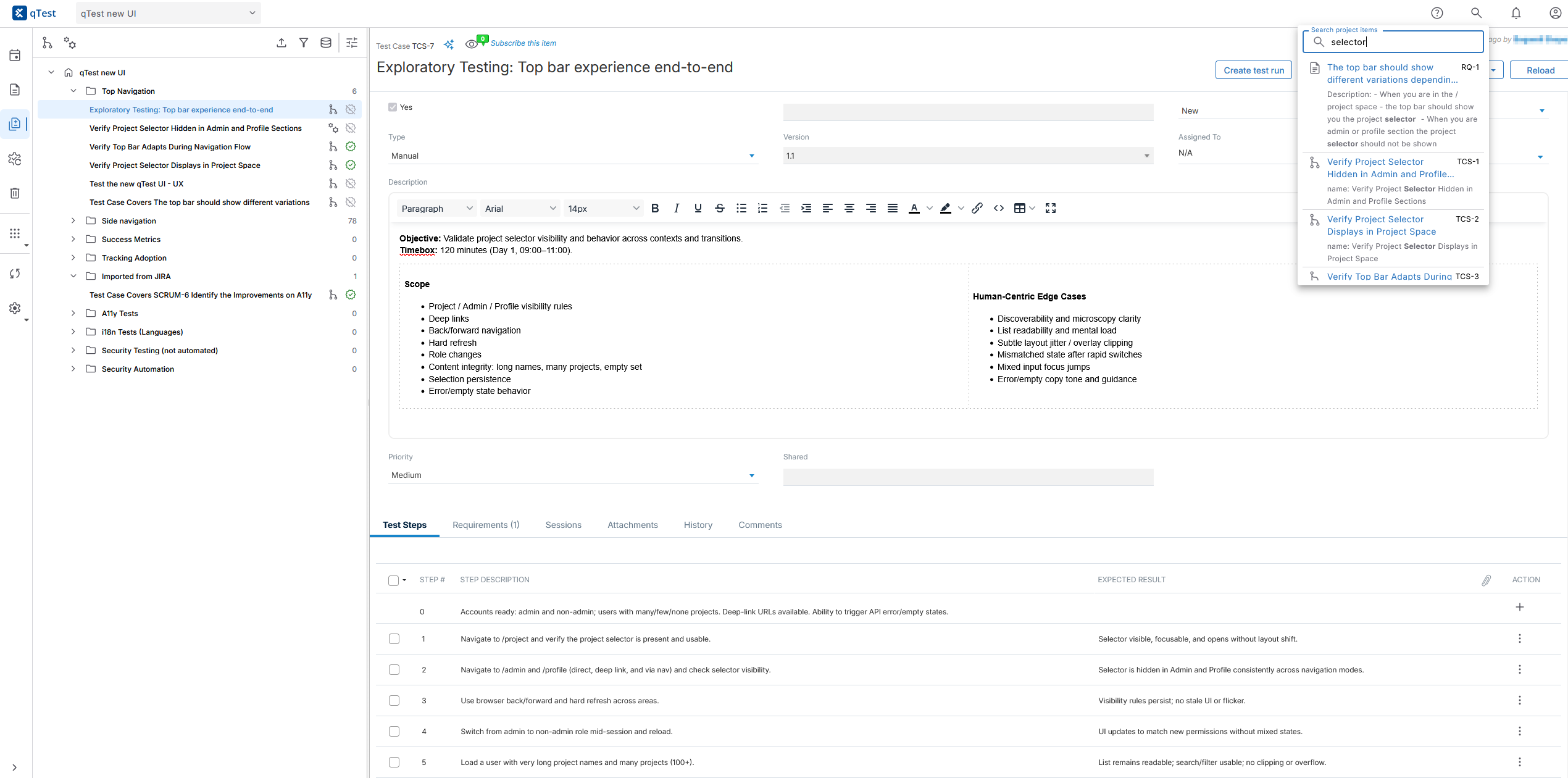
Manage your testing journey from start to finish in one location.
With qTest Manager, you can navigate between our 5 main tabs to:
-
Create a detailed, organized test plan according to your preferred methodologies.
-
Track your goals with requirements.
-
Break down your testing needs with test cases.
-
Execute and track test run and defect progress.
-
Stay organized and informed throughout your testing process.
Before you start
Before you can start creating objects or running tests, as a site administrator, you need to perform a few tasks to get everything up and running:
Test plan
Create a test plan to define the testing timeline and objectives for each Release or Build in your project. You can also attach Requirements to each Release or Build.
While release and build are the qTest terms for these testing objects, the objects themselves can also be used for other time periods. For example, you could assign these objects to sprints for Agile projects or different testing phases for Waterfall projects.
Learn how to:
Requirements
Create or import Requirements to define an individual testing objective. You can use the nested folder structure to create and organize a repository of requirements.
Requirements can help you define how different areas of your software should function during testing. You can also link Requirements to Test Plans, Test Cases, or Test Runs for traceability.
Learn how to:
Test design
Create or import Test Cases to define an individual testing scenario, including the specific test steps that you need. Use the nested folder structure to create and organize a repository of test cases.
You can reuse Test Steps and Test Cases to save time when you design similar tests. To better track changes, you can also version your test cases and test case approvals, as well as link Test Cases to Requirements for traceability.
Learn how to:
Test execution
Organize and run your Test Runs. You can create Test Runs from Test Cases, and then run them under specific Releases, Test Cycles, or Test Suites. You may choose to organize your test runs based on different scenarios, such as environments, test data parameters, or configurations.
When you run your tests, you can view the expected steps and results as you record actual results alongside any defects you encounter.
Learn how to:
Defects
Create, view, and edit Defects with qTest Manager's internal defect tracker. Track failures as you find them, and link them to the test runs where they appeared.
Please note that this tab and its related functions don't display if you're using a defect integration.
Learn how to:
Data privacy notice
qTest is a software testing product to be used in a testing environment with test data. Do not store credentials in qTest.
Have Questions?
You can always access the Support Portal and the qTest manual through your qTest instance. Just select Resources  to see your options.
From the dropdown, you can go to Go to documentation to access a manual article that relates to what you're working on in qTest.
Or, you can go to Contact support to take a look at the Support Hub, where you can look through the knowledge base or log in to get help from a real person, depending on your needs.
Need support to log in to your instance? After you contact us, enable support login and give the support@tricentis.com account the permissions needed for us to see your issue, and we'll be able to log into your qTest instance to see things from your perspective. This won't affect your license count.