Create a test execution hierarchy
On the Test execution tab, you can create a hierarchy to plan your testing before you run it. You decide how to structure it. For example, use test cycles for sprints and test suites for teams, or use test cycles for software segments and test suites for sprints.
The tools to create a hierarchy are flexible. You only need to keep these rules in mind:
-
You can't create test runs at the project root. You can create releases, test cycles, or test suites.
-
You can only use test suites to store test runs. Test suites can't store any other objects.
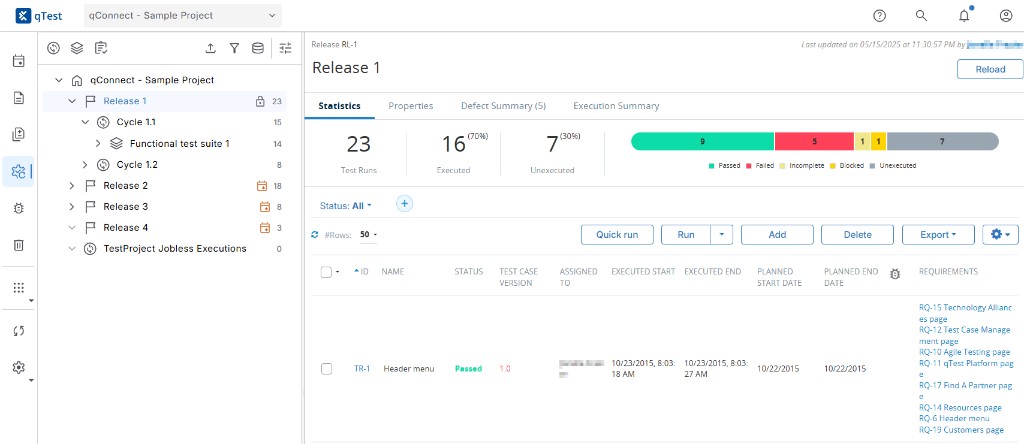
In Test execution tab, you can use releases, test cycles, and test suites to organize your test runs.
You can't add test cycles or test suites to objects that are linked to objects in Tosca.
Create a release
Releases are the top level of the test execution hierarchy, and you set them up at the very beginning of the testing process when you create your test plan. You can manually create releases or import them from a third-party Application Lifecycle Management tool, such as Jira, Rally, or VersionOne. qTest displays all releases in the Test Plan tab and the Test Execution tab.
Create a test cycle
Test cycles are directly below releases in the typical hierarchy. You can add them to the project root, a release, or another test cycle. Test cycles can contain test suites, test runs, or other test cycles.
To create a test cycle, select the object you want to create the test cycle in. Then, select  New test cycle to add a new, untitled test cycle to the tree panel.
Don't forget to give your test cycle a name. You can also enter details for the test cycle on its Properties tab.
Create a test suite
Test suites are the lowest-level container to organize test runs. They contain more information than a test cycle on the Properties tab, but can't be nested inside each other, like test cycles can. You can add them to the project root, a release, or a test cycle.
If you create a test suite within a release, the Planned Start Date, Planned End Date, Target Release/Build, Assigned To, and Execution Type fields in the Properties tab automatically populate based on that release's information.
To create a test suite, select the object you want to create the test suite in. Then, select  New test suite to add a new, untitled test suite to the tree panel.
Don't forget to give your test suite a name. You can also enter details for the test suite on its Properties tab. Test runs you create in this test suite will inherit these properties.
What's next
After you build your test execution hierarchy, you're ready to create test runs.
Want to customize these Test execution objects? Learn how to Field Settings.