Schedule a test run
A scheduled test run reserves the resources your test needs and starts the test automatically when the time slot begins. Use it for nightly runs, or for any test you want to run outside office hours without someone there to start it.
Scheduled runs require a workspace type that supports reservations.
Before you start
Before you schedule a test run, make sure you have the following:
-
Reservations enabled for your account. An administrator turns this on in Settings > Reservations.
-
A configured test in the workspace you want to run it from, with an uploaded project, a scenario, and a zone.
-
A workspace without guaranteed resources. You can't schedule a run on a workspace that has guaranteed resources.
Schedule a test run
To schedule a test run, follow these steps:
-
Go to Settings > Reservations and select Schedule test run.
-
Select the Workspace that contains your test.
-
Select the Test you want to run. Enter part of the test name to filter the list.
-
Set the Start date, Start time, End date, and End time. The test starts when the slot begins. These fields use the same time zone that NeoLoad Web uses for every other time it displays, so a slot means the same thing here as it does on your test results.
-
Check the availability message below the date fields. It shows how many Web VUs are free for that slot
-
Select Schedule.
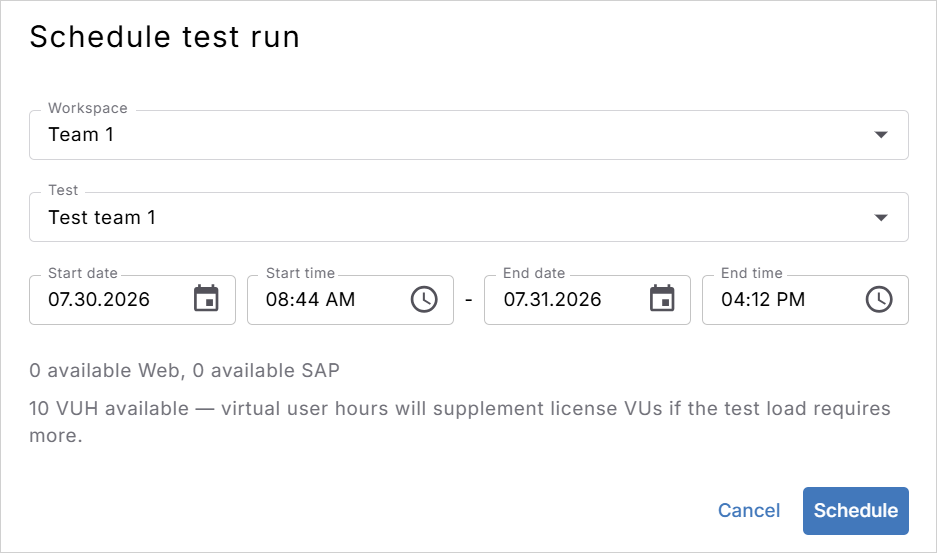
Click to enlarge: Pick the test and the time slot to run it in.
The scheduled run appears in Settings > Reservations with a Planned status until its time slot begins. NeoLoad Web then reserves the resources and starts the test for you. To review or delete a scheduled run, check out Manage reservations.
The time slot must last at least 20 minutes, and it must be longer than the test duration plus 20 minutes. If the slot is too short, the dialog displays an error and doesn't schedule the run.
Each scheduled run starts once. There's no recurring option, so schedule every run you need, even for a test you run nightly.
A scheduled run consumes virtual users
If the test load needs more VUs than your license has free, NeoLoad Web draws on your VUH balance to cover the difference.
If the reserved resources aren't available when the run starts, the test fails to start. For more information, check out When reserved resources aren't available.
What's next
Now that your test run is scheduled, here's what you can do next:
-
Manage your reservations to track the run in the Grid or Calendar view.
-
Create a reservation instead if you want to hold resources but start the test yourself.
-
Analyze the test results once the scheduled run finishes.