Build test sheets
Test sheets are a core component of all test case design solutions. A test sheet represents the basic test framework for a particular user journey or process through your application. It defines the elements you want to test and all their possible values.
This topic explains how to work with both types of test sheets:
-
Test sheets that belong to business flows, which you use in process-based test case design.
-
Standalone test sheets, which you use in template-based test case design.
Before you start
To work with test sheets, you must be an administrator or contributor.
Open a test sheet
The location of your test sheets depends on your chosen test case design solution:
-
To open a test sheet that's the result of a business flow, select the corresponding path in the
 Paths panel of your business flow. Then, select Edit test sheet.
 -
To open a standalone test sheet, go to
 Prepare > Test sheets and select it from the list.
Understand your test sheet
Your chosen test case design solution determines the contents of your test sheet. There are differences between the two.
Please choose your use case:
In process-based test case design, Tosca Cloud automatically creates one test sheet for each path in your business flow.
Let's say your path consists of the following activities:
-
My first activity, which you've linked to a reusable test step called Reusable test step A.
-
My second activity, which you've linked to Reusable test step B.
-
My third activity, which you've linked to a reusable test step called Reusable test step C.

Activities in a path
Each reusable test step has business parameters. For example, Reusable test step A has the business parameters Business parameter 1 in reusable test step A and Business parameter 2 in reusable test step A.
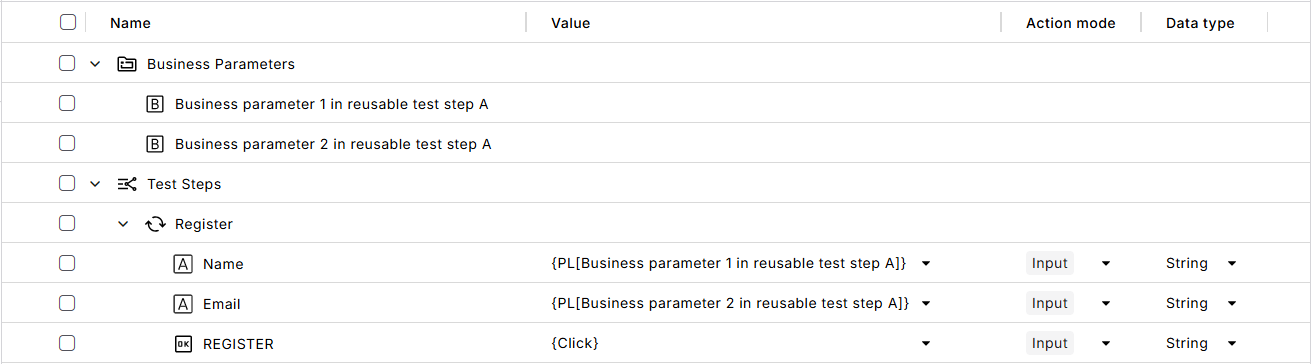
Reusable test step with business parameters
In this case, Tosca Cloud creates a basic test sheet that contains one folder per activity.
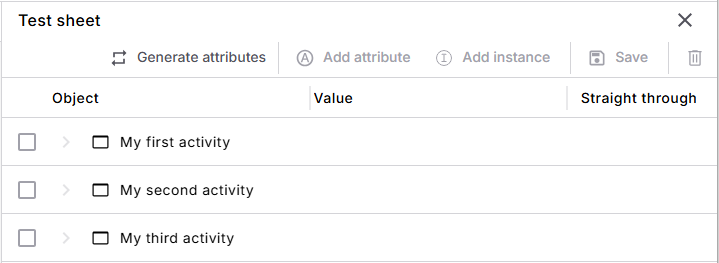
Newly created test sheet
Now, it's your turn to build this test sheet:
-
To define the elements you want to test, add attributes. The quickest and easiest way to do this is to generate attributes. In this case, Tosca Cloud automatically creates one attribute per business parameter.
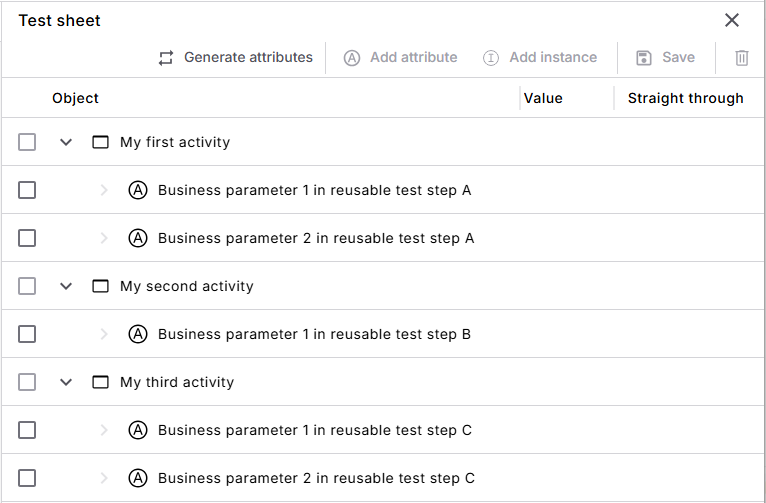
Test sheet with attributes
-
To define which input values you'll allow for an attribute, add attribute instances. Let's say that Business parameter 1 in reusable test step A is linked to a field where users enter their name. In this case, your attribute instances are different names that you want to use in your test cases.
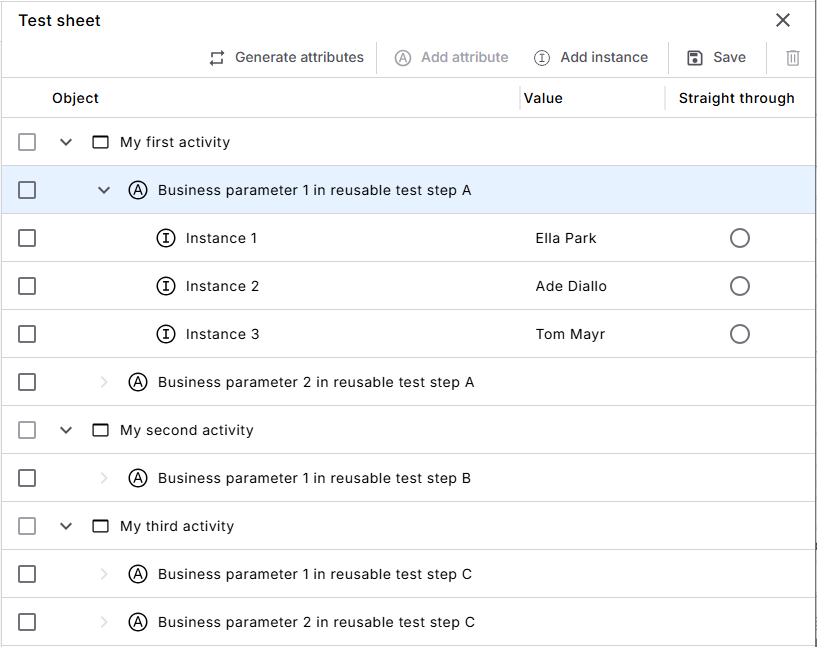
Attribute Business parameter 1 in reusable test step A with attribute instances
In template-based test case design, you create your own test sheet from scratch. You'll later link this test sheet to a test case template.
In your test sheet, you need to create the following objects:
-
To define the elements you want to test, add attributes. For example, if your test case template steers two textboxes and a button, then you need three attributes.
You can also nest attributes. For example, to group them by requirements.
-
To define which input values you'll allow for an attribute, add attribute instances. For example, if one of the textboxes is a Name input field, your attribute instances are different names that you want to use in test cases.
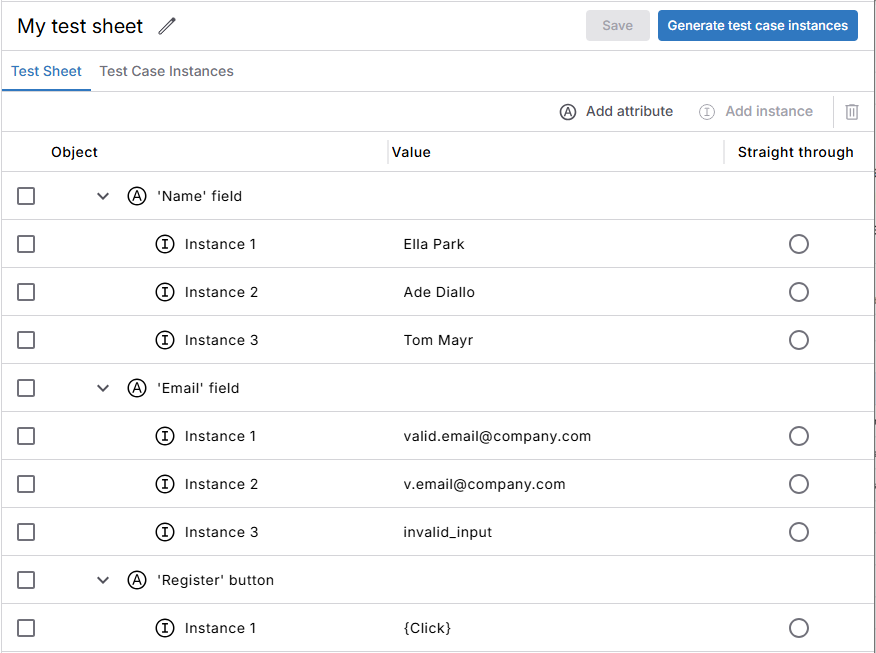
Test sheet with attributes and instances
Build a test sheet
Your chosen test case design solution determines how you build your test sheets.
Please choose your use case:
In process-based test case design, Tosca Cloud creates a basic test sheet for each path in your business flow.
To build your test sheet from this basic version, follow these steps:
-
To define the elements you want to test, add attributes. Choose one of the following options:
-
To auto-generate attributes from the automation you've linked to the activities in the path, select Generate attributes. In this case, Tosca Cloud creates one attribute per business parameter and maps the two.
-
To create attributes manually, select Add attribute. For example, if you want to nest attributes.
-
-
For attributes you created manually, map the attributes to business parameters. That way, Tosca Cloud knows which controls in a reusable test step belong to which attribute. To map, go back to the business flow and open the activity's details pane. In the Link automation tab, perform the mapping.
-
To define which input values you'll allow for an attribute, add attribute instances:
-
Select an attribute. Then, select Add instance.
-
In the Value column of the new instance, enter a possible value for this attribute.
-
Add as many instances as you need. For example, if your attribute is an input field, add one instance for each input you want to test.
-
In template-based test case design, you build your own test sheet:
-
Go to
Prepare > Test sheets and select Create test sheet. -
To define the elements you want to test, add attributes. You can also nest attributes.
-
Define the possible values for your attributes:
-
Add instances if you want to define allowed input values. To do so, select an attribute and then, select Add instance. In the Value column of the new instance, enter a possible value for this attribute.
You can add as many instances as you need. For example, if your attribute is an input field, add one instance for each input you want to test.
-
Don't add instances if you can't define possible values in advance. For example, if you won't know the value until after the test case has run.
-
-
Define how each attribute participates in testing. To do so, select
 More actions in the row of an attribute, and then select your desired attribute type:
|
Description |
|
|---|---|
|
Business relevant |
Default type for all attributes in a test sheet. This attribute is relevant to your business and, therefore, to the testing scenario. A business relevant attribute can contain additional business-relevant dimensions as well as supporting information. As a result, business relevant attributes can have any type of child attribute: Business relevant, Not relevant, or Result. Whether an attribute has attribute instances determines how Tosca Cloud populates values in test case instances:
|
|
Not relevant |
This attribute isn't relevant to your business and, therefore, doesn't affect the testing scenario. A not relevant attribute can contain supporting information but can't contain additional business-relevant dimensions. As a result, not relevant attributes can only have child attributes that are Not relevant or Result. Whether an attribute has attribute instances determines how Tosca Cloud populates values in test case instances:
|
|
Result |
This attribute represents information that you will verify during test execution. A Result attribute has a different purpose, but otherwise behaves the same way as a Not relevant attribute. |
Convert manual values into attribute instances
For some attributes, you may not add attribute instances in the test sheet. Instead, you'll manually enter a value in the test case instances. For example, if a value depends on the specific combination of other values.
You can convert manual values into attribute instances. This way, once you know these values, Tosca Cloud can use them automatically when you regenerate test case instances.
To convert manual values, go to your test case instances and selectMore actions in the row of the respective attribute. Then, select Convert values to instances.
Tosca Cloud creates one attribute instance for each unique manual value you entered for this attribute. If you have duplicate values, Tosca Cloud merges them into one attribute instance.
You can also convert attribute instances to manual values. For example, if you still need to fine-tune before you can automate your inputs. To convert, go to your test case instances and selectMore actions in the row of the respective attribute. Then, select Convert instances to values.
Nest attributes
Both test case design solutions support nested attributes in test sheets. You can nest attributes, for example, if you want to group attributes by requirements or other criteria.
To add a child attribute to an existing attribute in your test sheet, select the respective attribute. Then, select Add attribute.
Note that you can have a maximum of 50 levels of attributes.
Mapping for process-based test case design
If you use process-based test case design and you nest attributes, then you have to do some manual mapping. When you nest attributes, you'll have the following:
-
Attributes that are merely structural. These are the parent attributes that contain child attributes.
-
Attributes with instances. These are the attributes where you define all allowed input values.
You need to map the attributes with instances to business parameters. This tells Tosca Cloud which control in the respective reusable test step belongs to which attribute. To map, go back to the business flow and open the activity's details pane. In the Link automation tab, perform the mapping.
Use nesting to map functional dependencies
This functionality is available for template-based test case design.
Some attributes depend on the value of another attribute. Let's say you have an attribute called Country with the attribute instances Austria, Czech Republic, and Japan.
Country also has child attributes:
-
Child attribute Country code has the attribute instances AT, CZ, and JP.
-
Child attribute Member of EU has the attribute instances Yes and No.
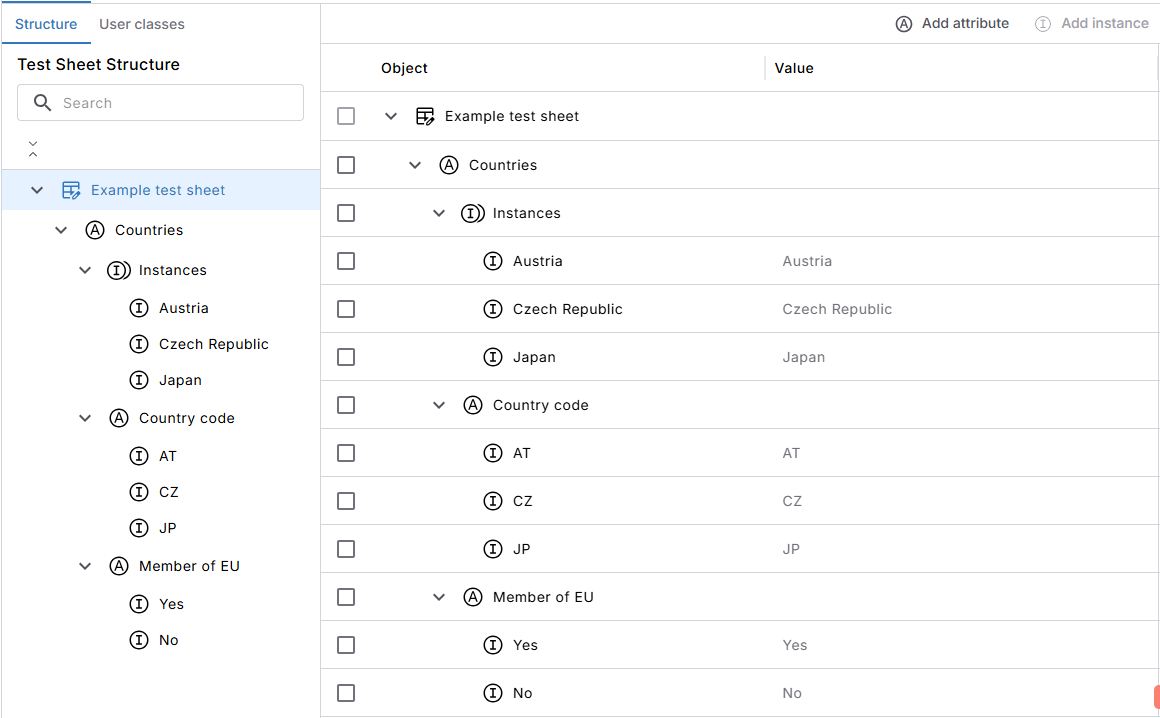
Nested attributes
The values of these child attributes depend on the selected country. For example, for Japan, the corresponding values are JP for Country code and No for Member of EU.
You need to map these dependencies in your test sheet. If you don't, Tosca Cloud treats each attribute independently. As a result, it may combine values that don't belong together when you generate your test case instances. For example, it could combine Austria with the country code JP or No for Member of EU.
To map dependencies, follow these steps:
-
Select the parent attribute in the attribute tree.
-
Tosca Cloud displays one column for each attribute instance of the parent attribute. For each child attribute, select the corresponding attribute instance in each column.
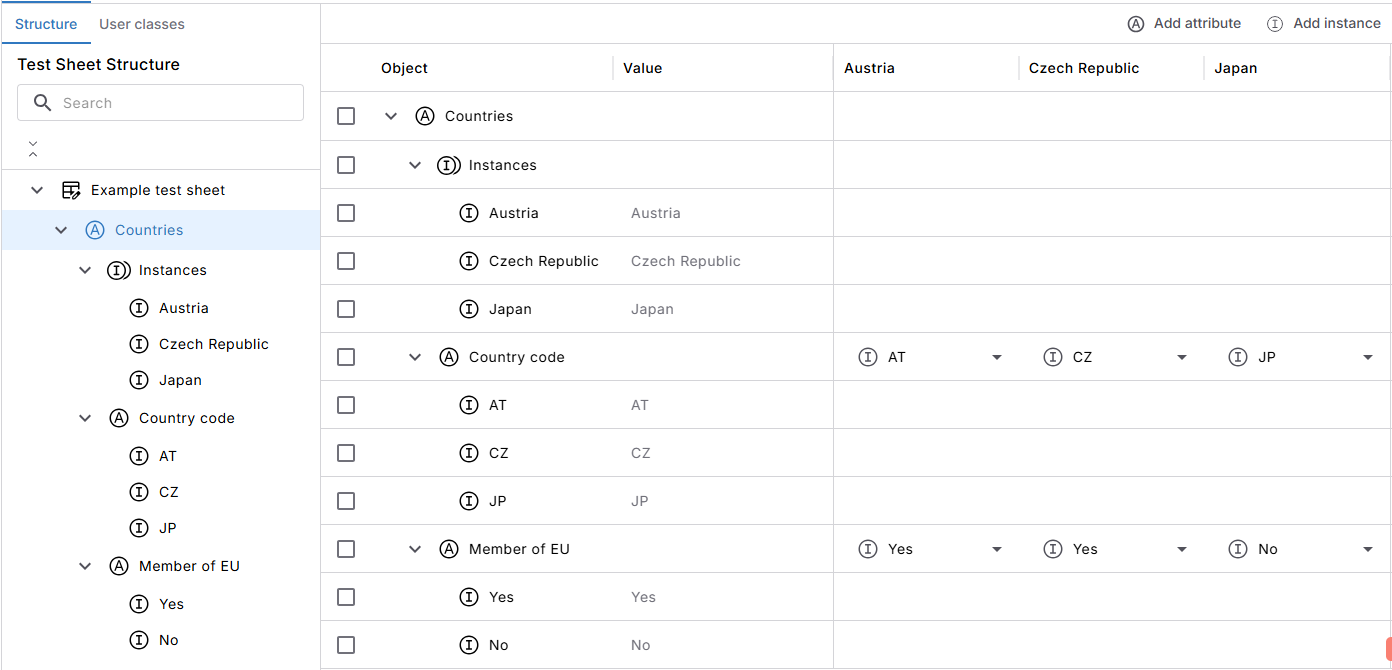
Mapped dependencies in a test sheet
Create and use classes
This functionality is available for template-based test case design.
Classes let you reuse the same attributes across multiple test sheets. When an attribute changes, you only need to update the class and not each test sheet. For example, if several test sheets use the same sign-in attributes, create a class with these attributes and add it to each test sheet.
This keeps your test sheets consistent and reduces maintenance.
Create a class
You can create a class in the following ways:
-
Create a class from scratch. To do so, go to
Prepare > Test sheets and select Create class. Then, add your attributes and attribute instances. -
Convert an existing attribute into a class. To do so, select the attribute, and then select
More actions > Convert to class. Tosca Cloud replaces the attribute with the new class in the current test sheet. If other test sheets have the same attribute and you want to use the class instead, you need to replace it manually. You can convert one attribute at a time. Once the class exists, you can add other elements to it. For example, additional attributes, either on the same level or as children, and any attribute instances.
Use a class
Once you have a class, you can use it in your test sheets. To do so, open a test sheet and go to the User classes tab. There, select  Add next to the class you want to add.
If you're ever unsure where you've used a particular class, select it. Then, selectMore actions > View references.
Edit a class
You can edit a class anytime. However, you can only edit it in its detail view, not from the class reference in a test sheet or parent class.
To open the detail view, choose one of the following options:
-
Go to
Prepare > Test sheets and select the class from the list. -
Select the class in the test sheet or the parent class. Then, select
More actions > Jump to class.
Unlink or remove a class
If you no longer want a class in a test sheet or parent class, you can unlink or remove it:
-
If you unlink, Tosca Cloud dissolves the class reference. The attributes stay in the test sheet or parent class as standalone attributes.
-
If you remove, Tosca Cloud removes the class from the test sheet or parent class, together with its attributes.
In both cases, the class itself stays unchanged. The action applies only to the test sheet or parent class where you trigger it.
To unlink or remove, select the class. Then, selectMore actions and choose Unlink from class or Remove.
Delete a class
If you no longer need a class, you can delete it:
-
Go to
Prepare > Test sheets. -
Select the class you want to delete. Then, select
More actions > Delete.
If the class isn't used anywhere, Tosca Cloud deletes it.
If the class is still in use, Tosca Cloud offers to remove all links. In this case, Tosca Cloud dissolves the references. This means that the class attributes stay in the test sheets or parent classes, but are no longer connected to the class. You can then delete the class from the overview.
Nest classes
You can nest classes, which allows you to create larger workflows from reusable, centrally managed elements.
You can have a maximum of 50 levels in a class.
To nest classes, follow these steps:
-
Go to
Prepare > Test sheets and select the class that should act as a parent. -
In the User classes tab, select
Add next to all classes that you want to add as children. You can also add children to child classes.
You can also map dependencies for nested attributes in a class.
In the test sheet and in the test case instances, you can select the parent value. Tosca Cloud then automatically applies the mapped child values. You can't override them in the test sheet or the test case instances.
Define the straight through
The straight through is the most frequently used way that users complete a path. As a result, it's also the one with the highest risk.
To mark an attribute instance as part of the straight through, select More actions in the row of this instance. Then, select Set straight-through. This ensures that Tosca Cloud includes this critical combination in your test case instances.
You can also mark multiple instances of the same attribute as part of the straight through. For example, for regulatory or documentation purposes.
What's next
Once you've built your test sheet, you can move on to the next step:
-
If you use process-based test case design, generate your test case instances.
-
If you use template-based test case design, link your test sheet to a test case template.