Key concepts of test case design
Before you get started with your chosen test case design solution, let's go through a few key concepts. They'll help you better understand your tasks.
Process-based test case design
Here are the key concepts for process-based test case design.
Business flow
A business flow is a visual representation of business processes or user journeys through your application. It gives you a map of the key processes and flows you want to test. Ultimately, you'll use this map to create test cases in bulk.
Tosca Cloud supports the following types of business flows:
-
Business flows that you create yourself, in Tosca Cloud.
-
Business flows that Tosca Cloud creates, based on a business process model you designed in SAP.
Activity
An activity represents a meaningful action or interaction within your application. For example, one activity can be "open an application and sign in". You link each activity to a reusable test step, where you define the actual, automated test actions that Tosca Cloud performs for that activity.
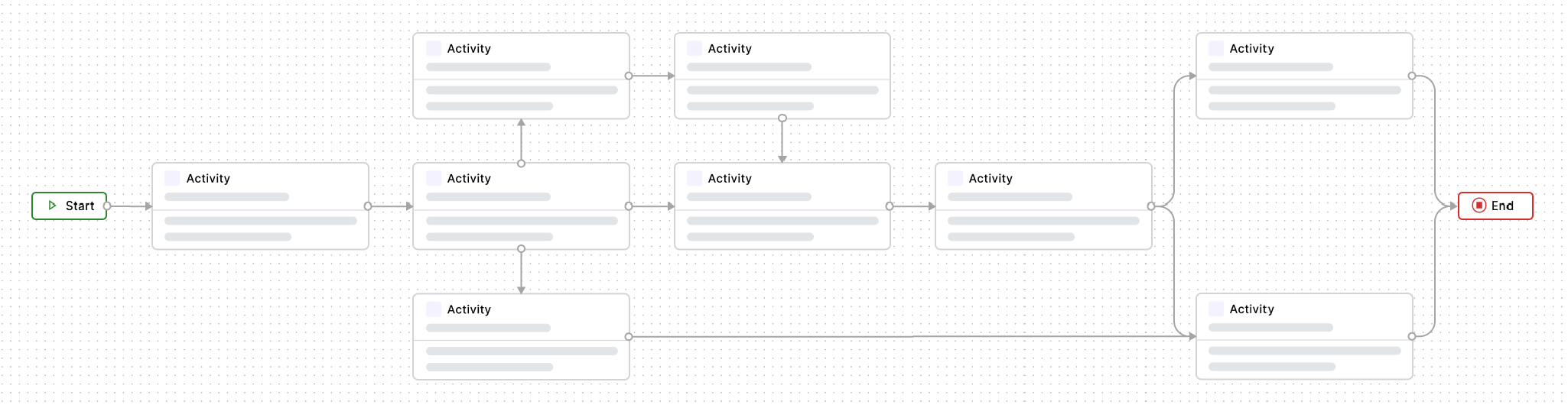
Click to enlarge: Flow of activities
Reusable test step
A reusable test step is a set of test steps which define the automated test actions that happen in the linked activity. Reusable test steps are designed to be shared, so you only need to maintain them in one place.
Since activities can appear in more than one path, reusable test steps allow you to reuse your test actions across multiple paths.
Path
A path is a specific sequence of activities through your business flow. Create different paths to represent different test scenarios. For example, one path might cover a typical happy path, while another might cover a user who enters unsupported data. Tosca Cloud automatically creates a basic test sheet for each path.
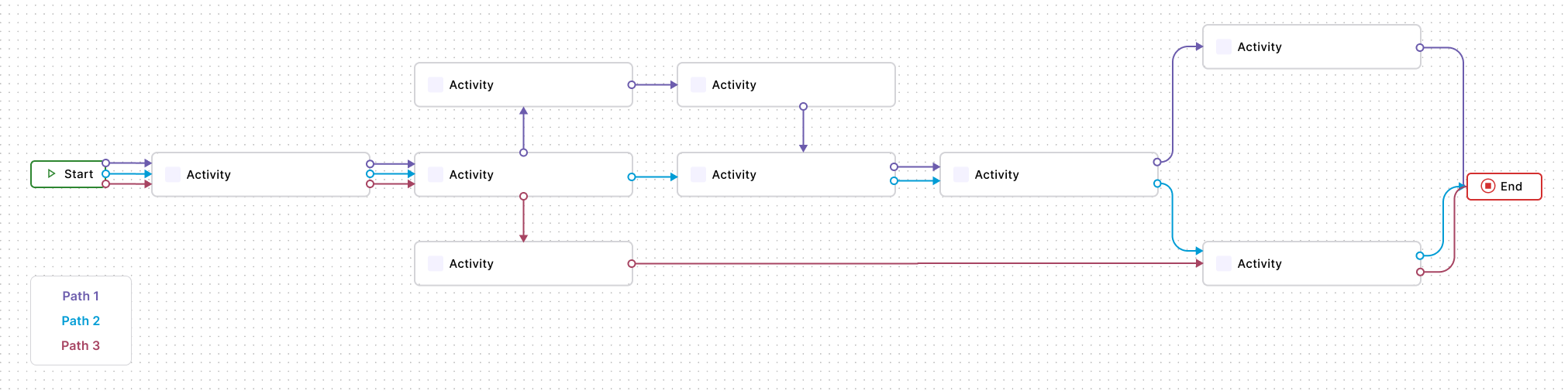
Click to enlarge: Some of the potential paths through these activities
Test sheet
A test sheet is the basic test framework for a particular path in your business flow. It defines the following elements:
-
Attributes, which are the elements you want to test.
-
Attribute instances, which are all their possible values.
Tosca Cloud automatically creates a basic test sheet for each path. To build this test sheet, add attributes and attribute instances to it.
Attribute
An attribute in a test sheet represents an element you want to test. For example, a control in your application.
Each attribute has one or more attribute instances, which define all allowed values for this attribute.
Attribute instance
An attribute instance in a test sheet is one specific input value for an attribute. For example, if your attribute represents a name field, each attribute instance is a different name you want to use in your tests. Together, the attribute instances across all attributes define the full range of values your tests will cover.
Test case instance
A test case instance is one specific combination of attribute instances from your test sheet. It defines one test scenario. Tosca Cloud generates one test case from each test case instance.
Template-based test case design
Here are the key concepts for template-based test case design.
Test case template
A blueprint based on an existing test case. You'll use your template to quickly generate test cases in bulk.
Test sheet
A test sheet is a table of input values that tells Tosca Cloud how many test cases to generate and what values to use.
Attribute
An attribute in a test sheet represents an element in your testing scenario. For example, a control in your application.
Attributes can have different value configurations:
-
Attribute instances. These represent all allowed input values for this element.
-
No value. The attribute is either a structural element that groups other attributes, or you define its value directly in test case instances. For example, if the value depends on other attributes in the test case instance.
Attribute instance
An attribute instance in a test sheet is one specific input value for an attribute. For example, if your attribute represents a name field, each attribute instance is a different name you want to use in your tests.
Class
A class is a set of attributes that you can add to multiple test sheets. When an attribute changes, you only need to update the class and not each test sheet. This helps you keep your tests consistent and reduces maintenance.
Test case instance
A test case instance is one specific combination of attribute instances from your test sheet. It defines one test scenario. Tosca Cloud generates one test case from each test case instance.