DI DB Expert Module
The DI DB Expert module is an automation tools module for Data integrity testing. This module offers the same basic functionality as the DB Expert module for handling database statements, with the additional option to use one of your Data Integrity connections for your tests.
This module contains the following values:
|
Value |
Description |
|---|---|
|
Connection |
Specify the DI connection you want to use for your test. To do so, select the Value field and choose a connection from the dropdown menu. Note that you can't override the specified connection with dynamic text expressions such as buffers or test case parameters. |
|
SQL Statement |
The SQL statement you want to execute. You can use our SQL editor to draft and test your query. To do so, hover over the SQL Statement test step and select |
|
Result Table |
Verify or buffer values from the result of your SQL statement. For more information on table steering, see chapter "Table". If needed, you can buffer or verify the table property RowsAffected. This property indicates how many rows the specified SQL statement affected. If the statement didn't affect any rows, the value is 0. For SELECT statements, the value is -1. Alternatively, if you want to export the result of your SQL statement into a comma-separated CSV file, enter {EXPORTTOCSV[<absolute path to the CSV file>]} as the value of Result Table. Note that when you run your test Tosca Cloud creates a file if one doesn't already exist. If a file with the same name already exists under this path, Tosca Cloud overwrites the existing file. |
|
Close Connection |
The default value True closes the connection after Tosca Cloud runs the SQL statement. If you want to keep the connection open, change the value to False. |
 then
then 
You want to check the content of a specific cell in the table Customers. You can access this table through your DI connection MyConnection1.
You can use the DI DB Expert module in the following way:
-
Enter the value MyConnection1 in the test step value Connection.
-
Enter the SQL statement Select * FROM Customers in the test step value SQL Statement to define the data you want to fetch.
-
Expand the test step value Result Table and define the following values:
-
Rename the <Row> test step value to $1 to specify you want to check a cell in the first row.
-
Rename the <Cell> test step value into #last to specify you want to check last the cell in the selected row.
-
Enter the value Smith in the #last test step value to check if the selected cell contains that name.
-
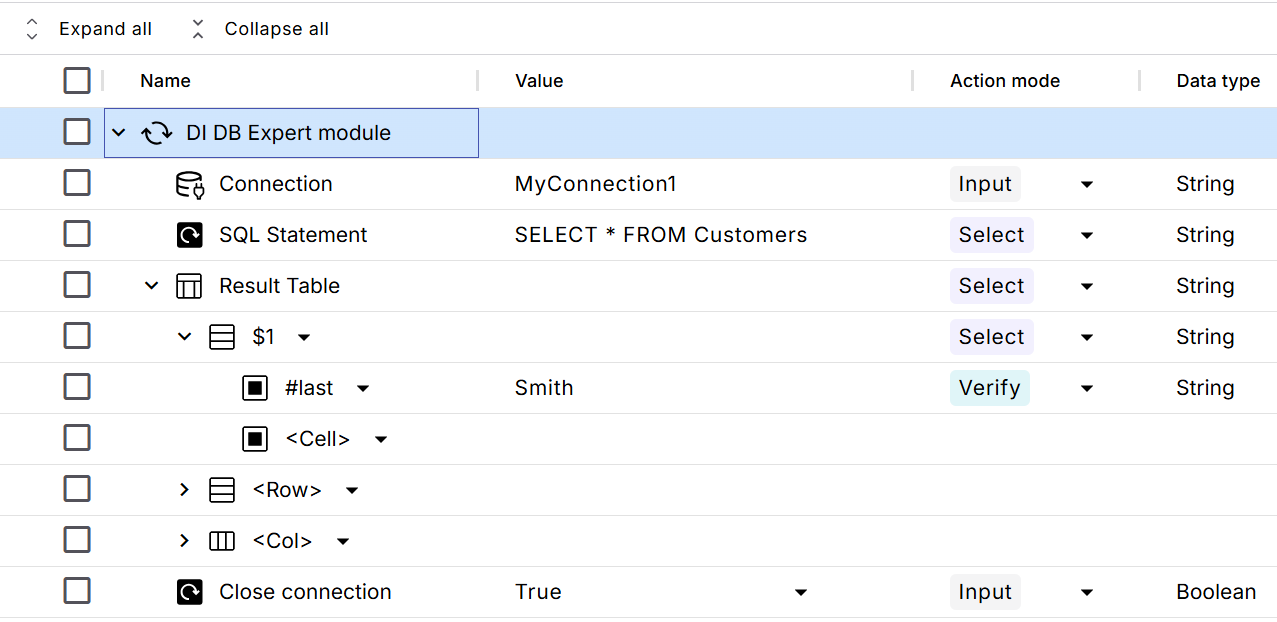
Check the content of a cell with the DI DB Expert module
To learn more about how you can steer tables with Tosca Cloud modules, check the chapter "Table".