Validate your data integrity
Data Integrity
The following main test types help you ensure data quality throughout all stages of your Data Integrity testing cycle:
-
Prescreening Tests: Verify whether your files contain the expected data.
-
Vital checks and field tests: Ensure the integrity of your data as well as the completeness and correctness of tables and fields.
-
Reconciliation tests: Compare closely two data sets from two different systems.
-
Report testing: Check the presentation and the content of reports.
-
Profiling: Validate data from a business perspective for logical consistency and correctness.
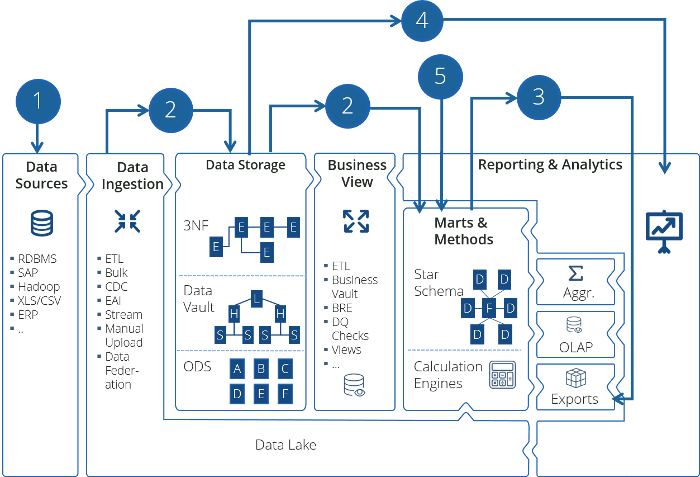
Data Integrity end-to-end support
Licensing
To access Data Integrity test assets in Tosca Cloud, you first need to activate a Data Integrity license for your workspace. For detailed information on acquiring licenses, contact your
Data Integrity assets, such as modules and connections, will not be visible in your workspace without a valid license.
Upload your Data Integrity tests from Tosca on-prem
When you upload Data Integrity connections to Tosca Cloud, any existing connections in your cloud workspace with the same name will be automatically replaced.
Alternatively, you can set up your Tosca on-prem tests to run on Tosca Cloud (opens in new tab) saving on your local resources.
Next steps
Get to know the Data Integrity modules.