Activate a license key
Activate your license key to link it to the machine where you installed it. You can transfer the key to another machine later. For more information, see Transfer a license key.
Evaluation license keys are already activated.
Before you start
Install a license key on the machine where you want to use NeoLoad.
Activate a license key with the GUI
The NeoLoad License Activation wizard opens automatically when a license key needs activation. You can also open it any time from Help > License management > License > Activate license.
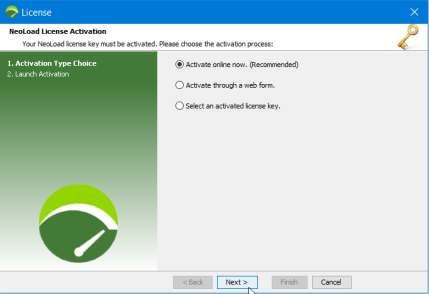
You can activate the license key in two ways:
-
Activate online now (recommended): Quick and secure. NeoLoad contacts the central license server for you. Requires internet access.
-
Activate through a web form: Use this when the machine has no internet access. NeoLoad creates a
license.reqrequest file that you submit to the central license server. The server returns a.licfile, which you load back into NeoLoad.
To activate a license online, follow these steps:
-
In NeoLoad, select Help > License Management.
-
Select License, then select Use a license file.
-
Select Activate license key.
-
In the NeoLoad License Activation wizard, select Activate online now, then select Next.
-
Select Next to launch the activation.
-
On the confirmation screen, select Finish.
To activate a license through a web form, follow these steps:
-
In NeoLoad, select Help > License Management.
-
Select License, then select Use a license file.
-
Select Activate license key.
-
In the NeoLoad License Activation wizard, select Activate through a web form, then select Next.
-
Choose where to save the activation request file, then select Next. NeoLoad creates the
license.reqfile. -
Submit the file in the activation form on the License Management section.
-
Select Finish.
-
When you receive the reply from the license server, open the NeoLoad License Activation wizard again and select Select an activated license key.
-
Select the activated license file, then select OK.
Activate a license key without the GUI
For more information about command-line arguments, see Execute NeoLoad on the Command Line.
To activate a license key without the GUI, follow these steps:
-
Start NeoLoad in non-GUI mode with this command:
NeoloadCmd -noGUI -project <your project> -launch <your scenario>NeoLoad creates a license.req file in the home folder of the current user. The console prompt shows the path.
-
Activate the license and download the license-activated.lic file from the License Management section.
-
Rename the file to license.lic.
-
Paste it into the NeoLoad user folder, overwriting the existing file.
NeoLoad loads the license file, and the License Information section shows its contents. You may need to restart NeoLoad for the changes to take effect.
What's next
Select license settings to configure how NeoLoad uses the license.