Install a license key
Install a license key to use NeoLoad with a local license file. You can install:
-
An evaluation license key from the Tricentis Support Hub.
-
A custom license key acquired from NeoLoad and sent to you by email.
Evaluation license keys are already activated.
Install a license key with the GUI
You install the license key from the license management tool. To install a license key, follow these steps:
-
Select Help > License management.
-
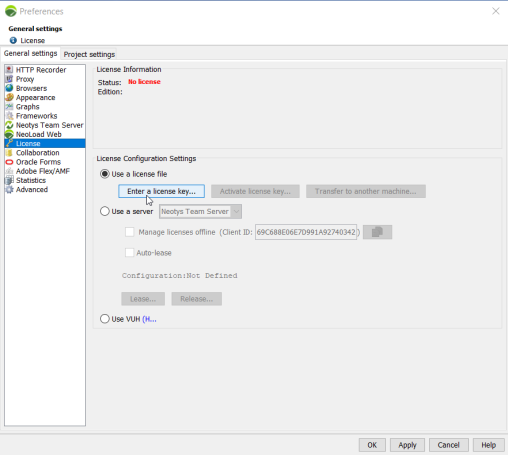
Select License, then select Use a license file.
-
Select Enter a license key.
-
Select your
.licfile, then select OK.
Once the license file is loaded, the License Information section shows its contents.
Install a license key without the GUI
You can install a license key without the GUI by copying the license file directly into the NeoLoad user folder. To install a license key without the GUI, follow these steps:
-
Copy your license file to the NeoLoad user folder for your operating system:
-
Linux or Unix:
/home/<username>/.neotys/NeoLoad(your home directory matches theuser.homeproperty). -
Windows:
C:\ProgramData\Neotys\NeoLoad.
-
-
Make sure the license file is named license.lic.
What's next
If the Status field shows "Not activated," Activate a license key to make it usable.
If the license file is invalid, it's either expired or deactivated for the machine. Transfer a license key to fix the issue.