Run tests with COBOL files
The CobolReader is a custom data reader for Common Business Oriented Language (COBOL) copybook files and Extended Binary Coded Decimal Interchange Code (EBCDIC) data files. It allows you to use these data sources in Data Integrity tests you create with the Complete Row by Row Comparison module and the Load Data into Caching Database from Customization module.
Supported data types
The COBOL reader supports the following COBOL data types:
|
Data type |
COBOL usage representation |
Precision (p) |
Scale (s) |
|---|---|---|---|
|
BINARY COMP-0 |
PIC S9 (1) to S9(4) COMP PIC S9 (5) to S9(9) COMP PIC S9 (10) to S9(18) COMP |
1 to 4 5 to 9 10 to 18 |
n/a n/a n/a |
|
CHARACTER ALPHANUMERIC |
PIC X(n) |
n |
n/a |
|
PACKED DECIMAL |
PIC S9(p)V9(s) COMP-3 |
p+s |
s |
|
NATIVE BINARY ZONED DECIMAL |
PIC S9 (1) to S9(4) PIC S9 (5) to S9(9) PIC S9 (10) to S9(18) PIC S9(p)V9(s) |
1 to 4 5 to 9 10 to 18 p+s |
n/a n/a n/a s |
Column name uniqueness
The CobolReader automatically makes all column names in the copybook unique. If two or more columns use the same name, the reader adds -<number> to the names of the duplicates, starting with 1. For example, if you have two columns called SomeColumn PIC X(1), the reader will load them as SomeColumn PIC X(1) and SomeColumn-1 PIC X(1).
When you create tests that involve column names, you need to use these updated column names.
Use the Cobol reader in test cases
Tosca Cloud supports COBOL and EBCDIC files in all Data Integrity tests you create with the Load Data into Caching Database or the Complete Row by Row Comparison module.
The way to access data in such files is the same for both modules. You need to fill out the test step value Custom Data Reader:
-
For Class Attribute Name, enter CobolReader.
-
Under Parameters, set up the following parameters:
|
Parameter name |
Value |
Optional |
|---|---|---|
|
CobolDataFile |
The absolute path to the COBOL data file. |
No |
|
CobolCopybookFile |
The absolute path to the COBOL copybook. The copybook contains the layout information for the COBOL data file and allow programs to interpret it. |
No |
|
CobolCodepage |
The name of the COBOL codepage to use to convert the data from EBCDIC to ASCII. The default value is IBM037. |
Yes |
|
FilterByGroup |
A list of group names from the COBOL copybook, separated by commas. The CobolReader only reads the child variables of the specified group(s) from the COBOL data file. Groups include normal group declarations and REDEFINES. |
Yes |
|
IgnoreFillerColumns |
Copybooks can contain filler columns that act as placeholders. To ignore filler columns in your tests, set this parameter to True. The default value is False. |
Yes |
Loading data from a COBOL file.
In this test case, you want to load data from a specific COBOL file into your caching database, so you can run a reconciliation test on it.
For the data loading part, you use the module Load Data into Caching Database.
These general test step values define data target and reporting:
-
Table Name is EBCDICTarget, which means you load the data into a table called EBCDICTarget in the cashing database.
-
Keep Existing Table Entries is False, which means that Tosca Cloud clears any existing content in EBCDICTarget before adding the new data.
-
Custom Data Reader > Class Attribute Name is CobolReader, which means you're using the custom data reader to read your COBOL file.
-
Load Error Behavior > File name is C:\Error_Reports, which means that if Tosca Cloud encounters errors during the load, it saves a report to this location.
And these Parameters specify the data you want to load:
-
CobolDataFile defines the location of your COBOL source file: C:\Tempt\datafile.dat.
- CobolCopybookFile defines the location of your COBOL copybook: C:\Tempt\copybook.cfd.
-
CobolCodepage defines the codepage Tosca Cloud uses for converting EBCDIC data to ASCII: IBM037.
-
FilterByGroup defines the groups Tosca Cloud reads from the source file: Group1,Group2.
-
IgnoreFillerColumns has the value True. This defines that Tosca Cloud doesn't recreate the filler columns in the target table.
After loading the COBOL file data, Tosca Cloud should run a reconciliation test on them. So, you've added the module Complete Row by Row Comparison to your test case.
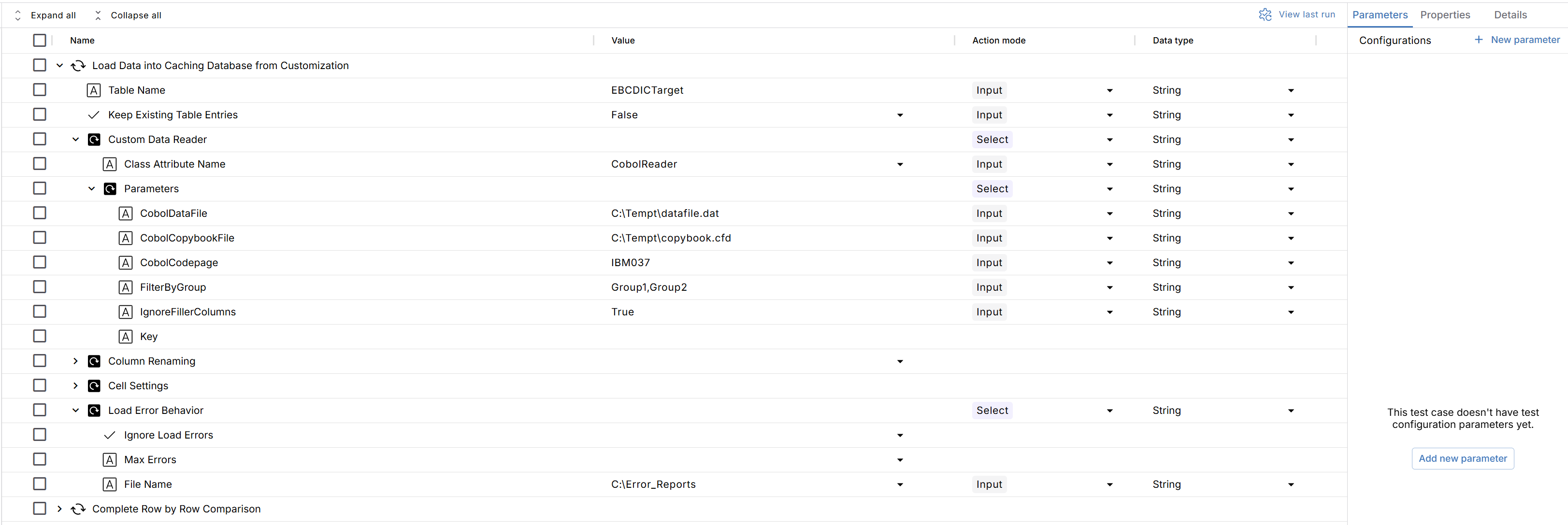
Your test case using the CobolReader