With the XBrowser Engine 3.0, you can test websites and other web applications. Use the Module OpenUrl to specify the website you want to test.
This Module is part of the Standard subset. You can find it under Standard modules->Engines->Html.
Specify a browser for your website tests
You can add test configuration parameters (TCPs) to specify the browser and browser installation that Tosca uses for your tests. If you don't specify any test configuration parameters and execute a test with the OpenUrl module, Tosca uses your default browser.
Select your browser
To select which browser Tosca uses, add the test configuration parameter Browser and enter one of the following values:
-
Chrome
-
Edge
-
Firefox
-
InternetExplorer
-
InternetExplorerInEdge
-
Island
-
Safari
Select your browser installation
When Tosca opens a browser, Tosca uses the default installation path of that browser to access its installation file. If you have multiple installations of the same browser on your machine, you can specify which installation Tosca uses for your tests.
To specify a specific browser installation, follow these steps:
-
Add the test configuration parameter Browser<BrowserName>Path, replacing <BrowserName> with the browser you want to use. You can choose from the following compatible browsers:
-
Chrome
-
Edge
-
Firefox
-
Island
-
-
Enter the absolute path to the executable file of the browser you want to use in the value field.
For example: Add the parameter BrowserChromePath to your test case with the value C:\Program Files\TestBrowsers\Chrome\chrome.exe to specify that Chrome runs from that executable, instead of the default installation.
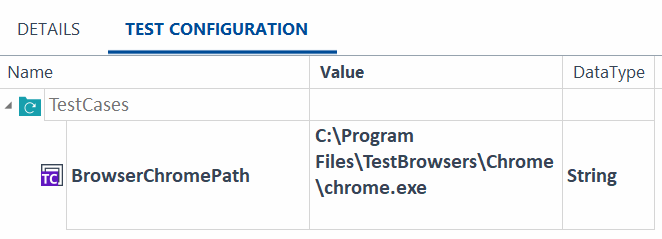
Specify chrome installation with a test configuration parameter