Create test configuration parameters
Test configuration parameters (TCPs) allow you to configure your tests for specific use cases and environments. You can use different kinds of TCPs:
-
Your own custom TCPs that let you reuse values across test steps. These TCPs help you reduce maintenance. For example, if you have to insert the same 20-digit code into various places in your application. In this case, create a TCP for the code and reference it in all test steps that need it.
-
Out-of-the-box TCPs that Tosca relies on for "background work", typically related to your test environment. These TCPs help you adapt your tests to specific test requirements. For example, if you want to run certain tests in a specific browser.
You can also use TCPs to override settings, which gives you extra flexibility in how you run your tests.
Add a test configuration parameter
You can use TCPs with the following objects:
-
Project root element
-
ComponentFolders and folders for
-
TestCases
-
ExecutionLists and ExecutionEntries
-
ScratchBook
All these objects have an additional Test configuration tab in the details view, where you can create TCPs.
To do so, right-click the object in the Test configuration tab and select  Create Test configuration parameter from the mini toolbar. Alternatively, use the keyboard shortcut Ctrl + N, Ctrl + ..
Configure a test configuration parameter
Once you've added your TCP, fill it out to define what it should do.
-
Out-of-the-box TCPs require a specific name and value. For a list of available TCPs with links to detailed information, check out "Test configuration parameters".
-
Custom TCPs can have custom names, values, data types, and value ranges:
|
Custom TCP attribute |
Description |
|---|---|
|
Name |
Enter a unique name that's easy to use and understand in a test case. |
|
Value |
Enter the same types of values that you use in TestSteps. If the TCP has a value range, you can also select one of the available values from the dropdown list. |
|
DataType |
Choose the appropriate data type, which depends on your value. TCPs support String, Boolean, and Password. |
|
Define a list of possible values, separated by semicolon. For example, Windows10;Windows11;Windows11_24H2. If you define a value range, your team can choose values from a dropdown list when they configure the TCP. This reduces the potential for errors and speeds up test configuration. Value ranges are especially useful in configurations. Note that it's still possible to enter a value for the TCP that's not in the defined range. |
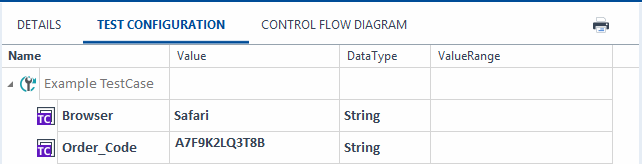
TCPs in the Test configuration tab of a TestCase
Understand inheritance
When you set a TCP on an object, all its child objects inherit this TCP. You can overwrite inherited values on the lower levels. If you overwrite a TCP value on a child object, all child objects of this object inherit the changed TCP value.
Let's say you have a TestCase folder called My folder. This folder contains the following objects:
-
Multiple TestCases.
-
Another TestCase folder called ProjectA. The ProjectA folder also contains multiple TestCases.
If you set the TCP Browser with the value Safari for the My folder folder, everything in it inherits the TCP, and Tosca will run all TestCases in Safari.
If you want to run the TestCases in the ProjectA folder in Chrome, simply change the TCP value for the folder to Chrome. In this case, all TestCases in the ProjectA folder inherit the changed value.
To set an inherited, changed TCP value back to the same value as the direct parent, right-click the TCP and select Reset to default value.
By the way, the object that defines a TCP always shows the TCP name in bold. Any object that inherits the TCP value shows the name in the regular style.
Reference test configuration parameters
With out-of-the-box TCPs that Tosca relies on for "background work", you don't have to reference anything. You set the TCP with the desired value, and Tosca performs actions in a certain way, based on the value. That's it.
With custom TCPs, you have to enter the following in all TestSteps that should use the custom TCP value: {CP[<TCP name>]}
Let's say you create a custom TCP called UserName with the value m.dorat@mycompany.com. To enter this email address into the login screen of your application, enter {CP[UserName]} in the respective TestStep.
Delete test configuration parameters
To delete a TCP, simply select Del. This removes the TCP from the following objects:
-
The object where you triggered the deletion.
-
All child objects, but only if they have the same TCP value. If you change an inherited TCP value on a child object, the child object keeps the TCP even when you delete it from the parent.
Note that you can't delete an inherited TCP only from the child object.
Bundle test configuration parameters
If you find yourself using the same TCPs over and over, we recommend that you create configurations instead. Configurations are bundles of TCPs that you maintain in a central location and assign to wherever you need them.