Use AI Chat
AI Chat is the side panel of Agent Performance Testing (APT), the AI agent that analyzes your test results. Ask APT for an analysis in plain language, and read its answer next to the data it describes.
APT also answers a single question about a result, or makes a single change to a test, through the APT Performance Assistant.
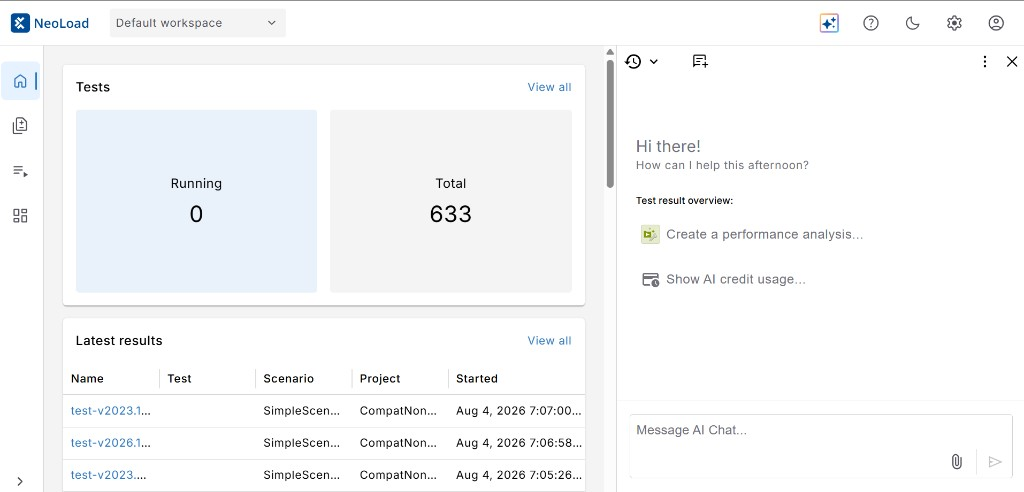
Click to enlarge: AI Chat panel at the start of the conversation
Before you start
To work with APT, make sure you have the following:
-
AI Chat access, which an administrator grants for each user.
-
AI credits in your account. AI Chat uses credits based on the amount of information it processes.
-
Local network access in your browser. Without it, the AI Chat panel doesn't load. For the browser steps, check out Troubleshoot APT - Analysis issues.
Open AI Chat
To open AI Chat, select the  AI Chat button in the navigation bar. When you start from a test result, APT works on that result, so you don't have to name it in your request.
The panel includes the following options:
-
 History: Open a previous conversation.
 -
 New chat: Start a conversation from scratch.
 -
 Settings: Check how many AI credits you have left.
Enter a prompt
Enter your request into the Message AI Chat box at the bottom of the panel. Name the result, the zone, or the time range you want APT to look at. The more precise your request, the better.
APT also offers you a starting point under Test result overview. Select Create a performance analysis to analyze a test result, or Show AI credit usage to see what your account has spent so far.
A third starting point, Deep dive into an element, scopes APT to a single element in a result. Starting the same deep dive from an element row in your results attaches the element for you. For the steps, check out Start a deep dive from a result row.
When your request changes a test, APT first shows what changes and waits for you to select Approve or Deny.
Run an APT - Analysis
APT - Analysis is the workflow that turns one test result into an AI report. To run it, follow these steps:
-
Open a test result.
-
Select the AI Chat button in the top navigation bar to open APT.
-
Select Create performance analysis.
APT opens the AI report tab and builds the analysis. A progress tracker shows the agent's status while it prepares the report.
What's next
Now that you know your way around AI Chat, here's what you can do next:
-
Work with the APT Performance Assistant to investigate one transaction or run a test.
-
Approve an APT report to record that you read the analysis and agree with the findings.
-
Read our AI data usage policy to see which data APT processes and where it goes.