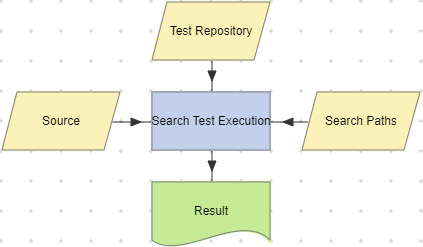
Search Test Execution actions
Search Test Execution actions search the specified Tosca, qTest or ALM Test Repository cache to find test executions that match any of the tokens you specify. The action stores the results in a Table dataset.
For performance reasons, Search Test Execution action searches Test Repository caches only, and not live Test Repositories. You can use the Create Test Repository Cache workflow in the Prerequisites templates folder to create a Test Repository cache. If the Test Repository cache is out-of-sync with current tests, this will affect the action's results.
| Action property | Description |
|---|---|
| Result | A Table dataset that contains a single record for each test executions found. |
| Search Paths | A String List parameter or dataset that stores a list of Test Repository cache paths to search. If you don’t set this property, the action searches the complete Test Repository cache. |
| Source | A Table parameter or dataset used to specify the tokens to be searched for in test executions. You should set this property should be set to the Result dataset returned by the Read Test Repository Cache or Search Test Repository action. |
| Test Repository | A Test Repository parameter or dataset that refers to the Test Repository cache to be searched for test executions. |
The Result dataset has the following columns:
| Column | Description |
|---|---|
| TEST_REPOSITORY | The name of the Test Repository whose cache the action searched for test executions. |
| TEST_REPOSITORY_TYPE | The type of the Test Repository whose cache the action searched for test executions. |
| NAME | The matched NAME value from the Source table. |
| TEST_STATUS |
The execution status for the test execution item. Possible values differ for each Test Repository type:
|
| LAST_RUN_DATETIME | The date and time when the test execution was last run. |
| TEST_NAME | The name of the test execution. |
| TEST_PATH | The path of the test execution. |
| TEST_ID | The unique ID of a found execution item. The format of the ID value will be different for each Test Repository type. |
The Result dataset will be empty if you specify an Azure DevOps or Certify Test Repository.
Example