Align Vera defect workflows with Jira
If your want to use Vera to handle approvals of your Jira tickets, you can create a Vera defect workflow that aligns with your Jira workflow. This way, approval transitions in Jira automatically trigger the correct Vera states. You don't need to create the entire Jira workflow.
Before you start
Keep the following in mind before you configure your workflow:
-
Include only ROUTE, ROUTE Complete, ROUTE Rejection, and REVISE states in your Vera workflow. Other Jira states don't need a Vera equivalent.
-
Match the Vera trigger name to the Jira transition name so the two systems stay in sync.
-
You can't see the Vera states in Jira.
-
Don't clone Jira issues after you route them for approval and set the Vera Sync ID. Cloning breaks the link between the Vera record and the Jira issue, which can cause approval data to go out of sync.
Create the workflow
To create a Vera workflow that aligns with Jira, sign in to the Vera web portal as an administrator and go to Workflows > Workflow Management. Then, create a new workflow and add the states that correspond to your Jira approval transitions.
After you activate the workflow, link it to the Record Type in your Records Management Policy. Then, create the Vera webhooks in Jira so that Jira transitions trigger the Vera actions.
Use the following table as a reference to match each Jira state and webhook to the correct Vera state, type, and trigger.
|
Jira State |
Jira To State |
Jira Webhook |
Vera State |
Type |
Trigger / Action |
To Vera State |
|---|---|---|---|---|---|---|
|
To Do |
Investigate |
N/A |
N/A |
N/A |
N/A |
N/A |
|
To Do |
Cancelled |
N/A |
N/A |
N/A |
N/A |
N/A |
|
Cancelled |
Investigate |
N/A |
N/A |
N/A |
N/A |
N/A |
|
Investigate |
Cancelled |
N/A |
N/A |
N/A |
N/A |
N/A |
|
Investigate |
Route for Review |
start_route |
Investigate |
GENERIC |
Transition |
Route for Review |
|
Route for Review |
Accepted |
N/A |
Route for Review |
ROUTE |
Route Complete |
Accepted |
|
Route for Review |
Cancelled |
N/A |
Route for Review |
ROUTE |
Route Rejected |
Investigate |
|
Route for Review |
Investigate |
cancel_route |
Route for Review |
ROUTE |
Transition |
Investigate |
|
Accepted |
In Progress |
N/A |
Accepted |
N/A |
N/A |
N/A |
|
In Progress |
Fixed |
N/A |
Accepted |
N/A |
N/A |
N/A |
|
In Progress |
Accepted |
N/A |
Accepted |
N/A |
N/A |
N/A |
|
Fixed |
Ready for Testing |
N/A |
Accepted |
N/A |
N/A |
N/A |
|
Fixed |
In Progress |
N/A |
Accepted |
N/A |
N/A |
N/A |
|
Ready for Testing |
Fixed |
N/A |
Accepted |
N/A |
N/A |
N/A |
|
Ready for Testing |
Route for Approval |
start_route |
Accepted |
GENERIC |
Transition |
Route for Approval |
|
Route for Approval |
Closed |
N/A |
Route for Approval |
ROUTE |
Route Complete |
Closed |
|
Route for Approval |
Rejected |
N/A |
Route for Approval |
ROUTE |
Route Rejected |
Rejected |
|
Route for Approval |
Ready for Testing |
cancel_route |
Route for Approval |
ROUTE |
Transition |
Ready for Testing |
|
Rejected |
Route for Approval |
start_route |
Rejected |
GENERIC |
Transition |
Route for Approval |
|
Rejected |
Accepted |
N/A |
Rejected |
GENERIC |
Transition |
Accepted |
|
Closed |
N/A |
N/A |
Closed |
COMPLETE |
N/A |
N/A |
The diagram below shows how a defect workflow maps between Jira and Vera.
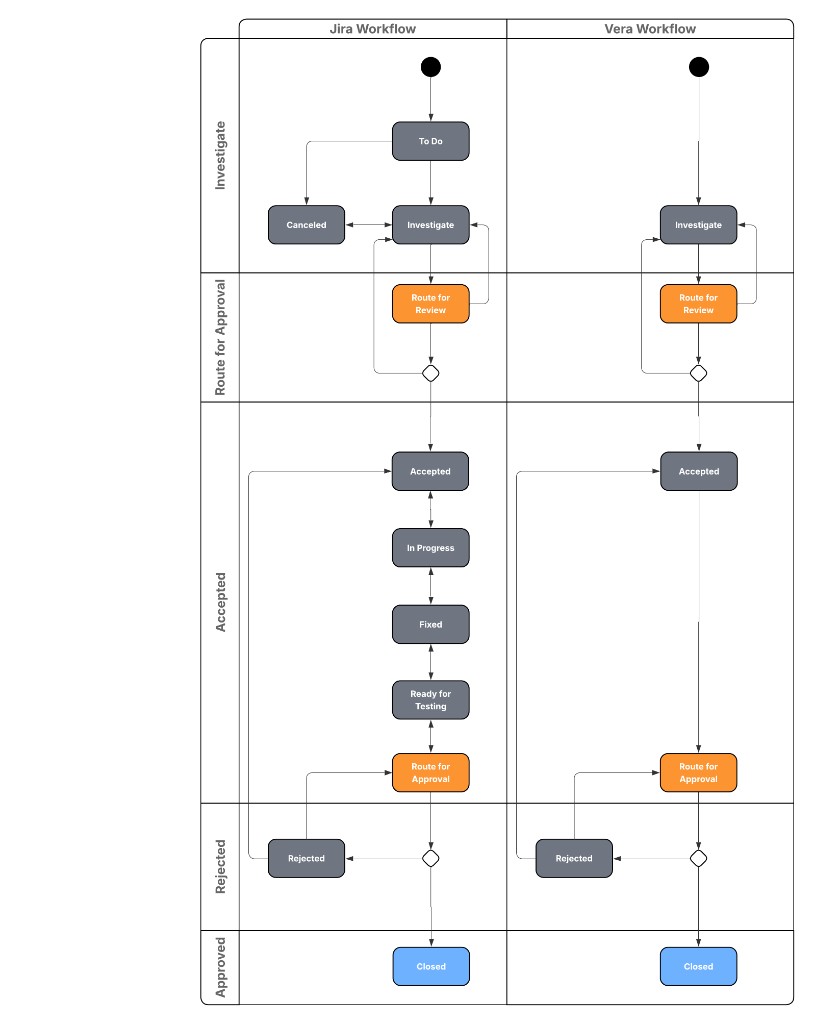
Click to enlarge: Jira and Vera defect workflow side by side
What's next
Now that you've aligned your workflow with Jira, here's what you can do next:
-
Integrate Vera workflow states into Jira workflows to connect your Jira transitions to Vera states.
-
Create Vera webhooks to let Jira communicate with Vera when you trigger workflow actions.