Vera administration tutorial
This tutorial will guide Vera administrators on how to configure Vera policies to meet business requirements and address administrator tasks.
Before you begin
Before you begin the Tricentis Vera administration tutorial, ensure that you fulfill the following requirements:
-
Installed Tricentis Vera 2023.2 or higher.
-
Installed qTest Manager 2023.4 or higher (Enterprise Edition).
-
Connected Tricentis Vera to qTest.
-
Current user has Tricentis Vera administration access.
-
Current user has qTest administration access.
Tutorial quick reference
During the tutorial, the Tricentis Vera administrator will set up a new qTest project with Tricentis Vera integration as associated to a new Tricentis Vera domain linked to a new policy set.
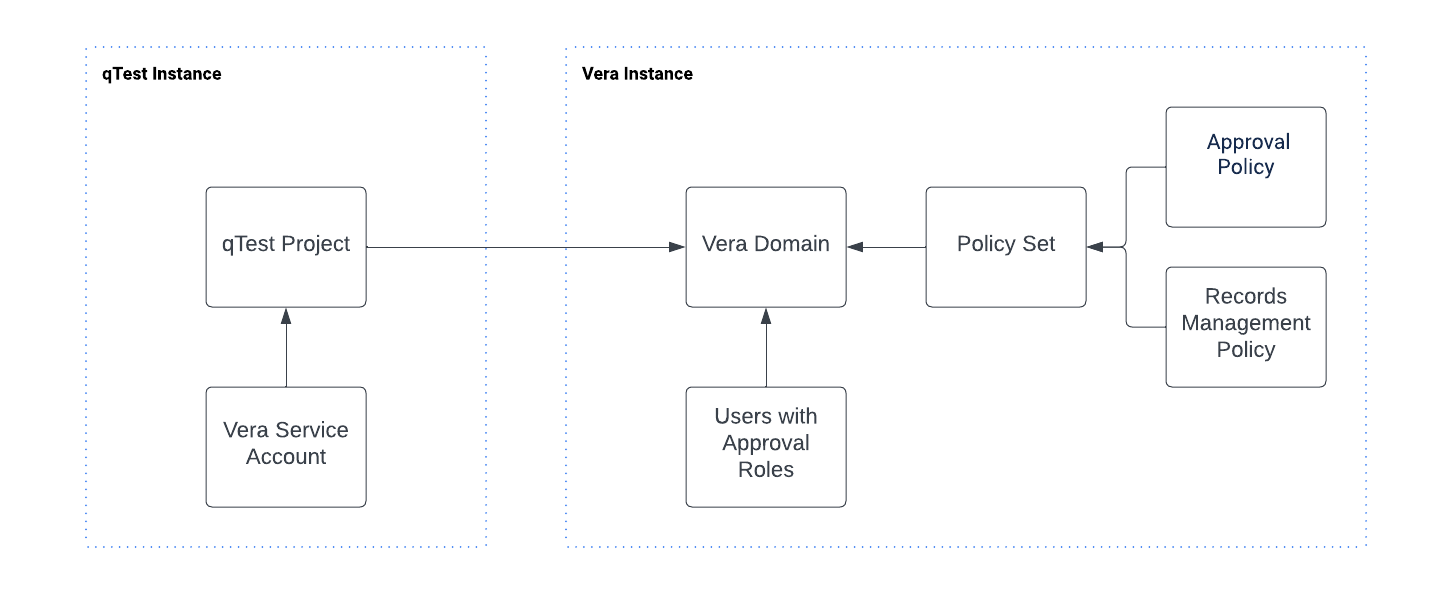
To successfully complete this tutorial, you need to perform the tutorial in the following order: