View シミュレータAgents
The シミュレータAgents page shows you all シミュレータAgents registered with APIシミュレーション and which simulation files they provide.To open it, go to  APIシミュレーション >シミュレータAgents in the menu bar on the left.
このページでは、以下の情報が表示されます:
-
The name of the agent machine where the シミュレータAgent is running.
-
The connection status of the registered シミュレータAgent.It's Connected if the シミュレータAgent is currently running and Disconnected if it's not running.
-
The version of the シミュレータAgent.
-
The date and time when the シミュレータAgent was last connected.
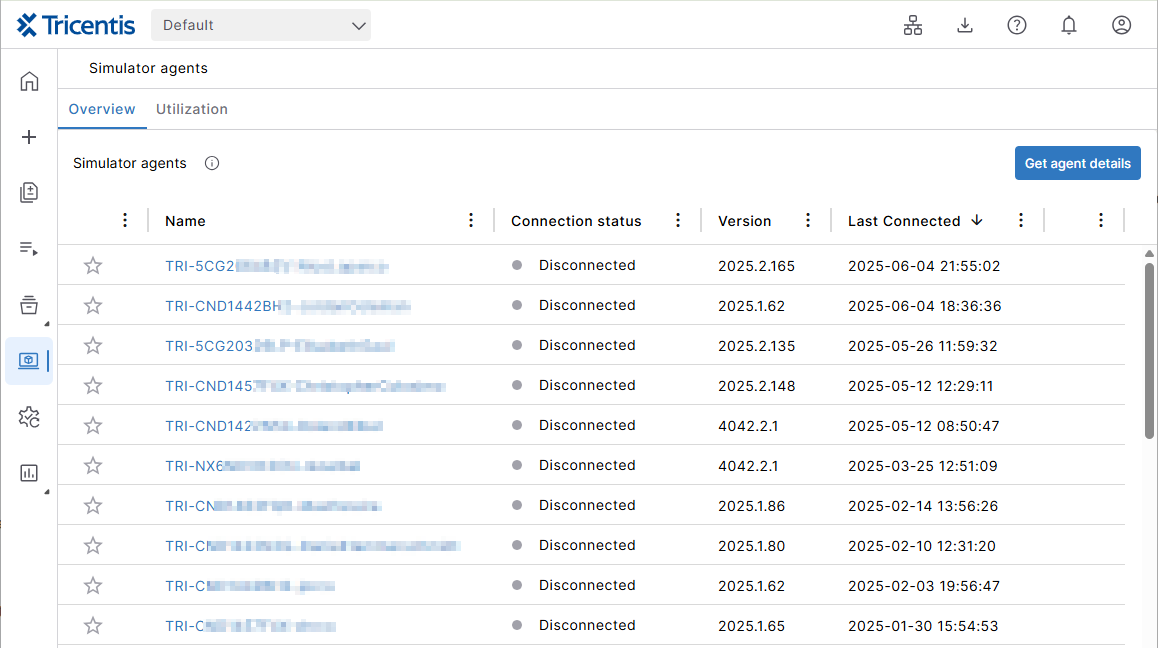
The シミュレータAgent overview page.
Click on a シミュレータAgent to show its inventory page.
View シミュレータAgent inventory
The シミュレータAgents details page shows you which simulation files are available on a particular シミュレータAgent.
Click on a シミュレータAgent to view its details.インベントリタブが開きます。
ページには以下の情報が表示されます。
-
提供されるシミュレーションファイルの名前。
-
シミュレーションファイルが作成された日時。
-
シミュレーションファイルに含まれるコンポーネントがなにか。これらは、主要要素接続、サービス、実行可能なサービス、リソース、またはインクルードなどです。
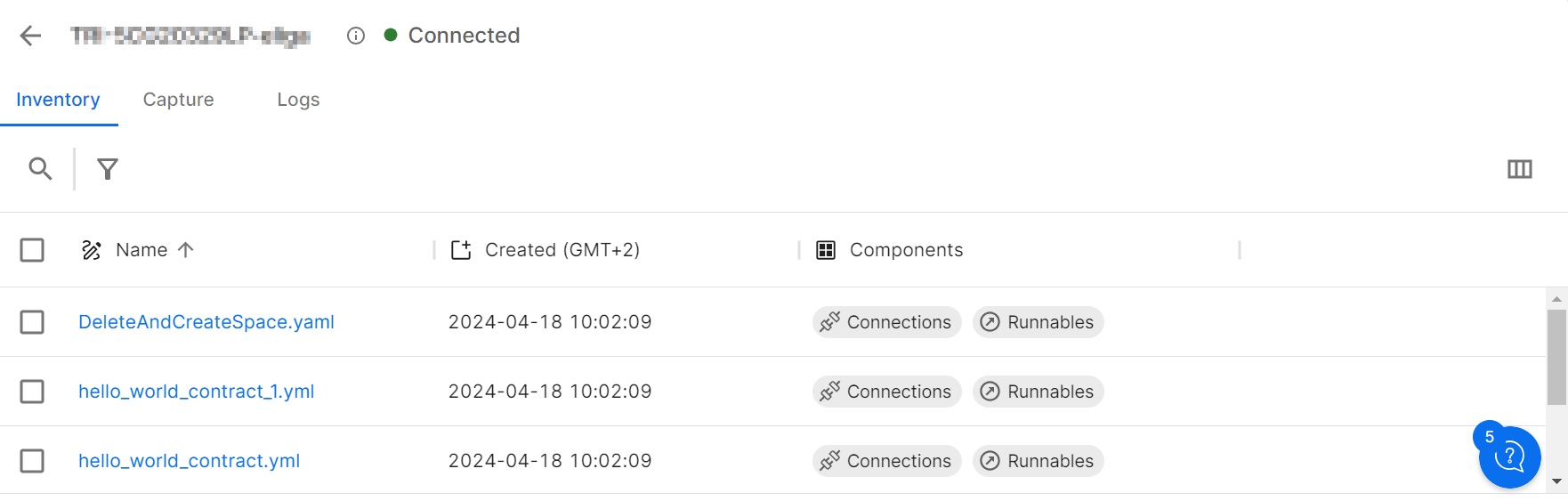
The シミュレータAgents details.
シミュレーションファイルを削除
To remove a simulation file from the シミュレータAgents inventory page, open its context menu and select Delete.複数のシミュレーションファイルを削除したい場合は、シミュレーションファイルを選択し、メニューバーの上部にある削除アイコンをクリックしてください。
シミュレーションファイルをシミュレーションレジストリにアップロードする
To organize your simulation files in one place, you can upload them from a シミュレータAgent to the simulation registry of your cloud organization.一つ以上のシミュレーションファイルを選択し、ショートカットメニューを開き「シミュレーションレジストリにアップロード」を選択します。
ログを確認します
Click on a シミュレータAgent and select the Logs tab to view all the processes that the シミュレータAgent has performed.以下のログの詳細が表示されます。
-
Any message sent or received by the シミュレータAgent.
-
各ログイベントのミリ秒単位のタイムスタンプ。
-
ログメッセージの重要性を確認するためのログレベル。
-
どの種類のログイベントであるか。
-
接続名がある場合は、接続名。
-
サービス名がある場合は、サービス名。
-
ログイベントが発生したステップの名前(名前が定義されている場合)。
-
追加または修正されたシミュレーション。
-
発生したエラー。
シミュレーションヒット使用状況を確認する。
A simulation hit happens when the シミュレータAgent receives an inbound message and processes it, such as performing a verification.ご利用いただけるシミュレーションヒットの数は、お客様のTosca Cloud プラン(新しいタブで開きます)によって異なります。
シミュレーションヒットの使用状況を確認するには、使用状況タブに切り替えます。このタブには以下の情報が表示されます。
-
The total number of simulation hits used by all agents in the ワークスペース.適切なデータを取得するための期間を選択することができます。
-
A list of all シミュレータAgents in the ワークスペース and the number of simulation hits they've consumed.
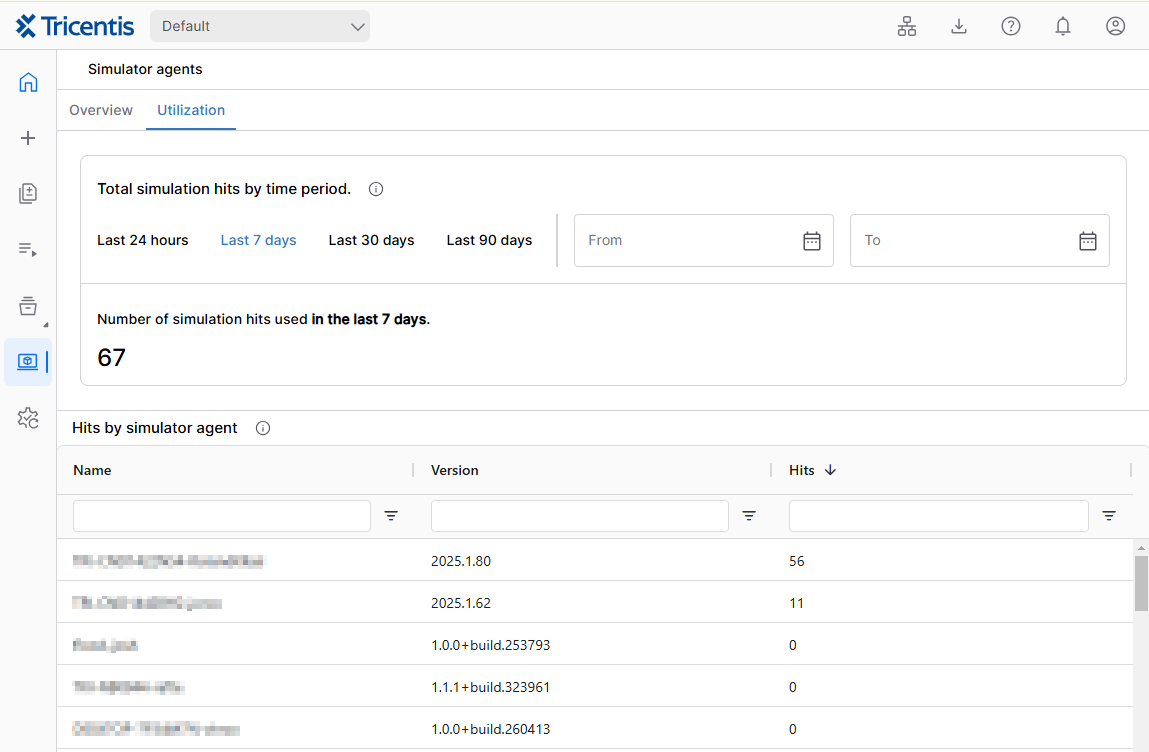
使用状況タブ
次の記事
Create a simulation from the traffic captured by your シミュレータAgent.