Define table headers
This functionality is only available in the old version of Tosca Cloud.
When you scan your table, Tosca Cloud automatically assigns header rows and/or columns, depending on what's in your application code.
In some cases, you may want to add headers. For example, if your first column is a de-facto header, but your code doesn't treat it as such. And it would be easier for your testers if Tosca Cloud regarded the first column as a header.
To define headers, open the Advanced View of Tosca XScan and select Content View from the ribbon menu. Then modify the respective checkboxes.
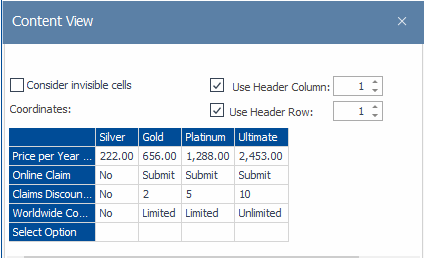
Content View: row 1 and column 1 are headers