Variables
Use variables to work with confidential data in your simulations. This lets you easily reference this data in simulation files and prevent other users who have access to these files from viewing sensitive information.
You can store confidential data in these types of variables:
Set variables
If you set environment variables in your system, use the prefix Simulator__Variables__ with the variable name. For example, use Simulator__Variables__My Secret Password.
To set variables in the appsettings.yml file, make sure you have administrator rights and follow these steps:
-
Open the appsettings.yml file.
-
Enter your variables in the Simulator settings under Variables using this syntax: <Variable name>: <Value>.
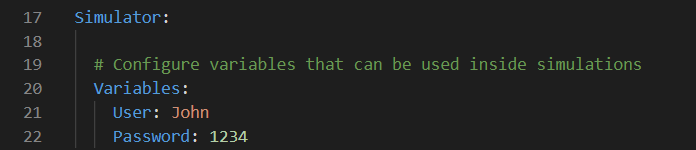
Appsettings.yml example entry.
Fetch data from variables
To fetch data from variables, use the syntax '{VAR[<Variable name>]}' in the Insert or Verify step properties.
In this example, the Insert step property writes the value of the variable named my_password into the header.
schema: SimV1
connections:
- name: token provider
endpoint: www.my-token-provider.com
listen: false
services:
- name: get valid token
steps:
- to: token provider
insert:
- type: Header
name: authentication
value: '{VAR[my_password]}'
- buffer:
- name: token