Tosca Distributed Execution
When you execute your tests, Tricentis Tosca takes control of your mouse and keyboard, so it can interact with the system under test. Consequently, users can't work on this machine for the duration of the test run. And if you have large test sets, it simply takes too long to run all of them on one machine.
With Tosca Distributed Execution, you can distribute your tests across all available computing resources, such as computers in your network, virtual machines, or the cloud.
This speeds up large test runs and leaves user machines unblocked.
As of Tricentis Tosca 2026.1 LTS, Distributed Execution is no longer enabled by default. While Distributed Execution is included in both Tosca Commander and Tosca Server installations, it requires manual activation:
-
Tosca Commander: The Distributed Execution Agent option in the installer is disabled by default. You must enable it before starting the Tricentis Tosca installation.
-
Tosca Server: All Distributed Execution related services remain disabled by default. You must enable the DEX Server after the Tosca Server installation.
For detailed information on how to enable the Distributed Execution Agent and DEX Server, check out this Tricentis Knowledge Base article.
Distributed Execution: main elements
Tosca Distributed Execution is only available for multi-user workspaces. You and other users share a repository, which stores test data and test results.
Tosca Distributed Execution consists of three main elements:
-
The user machines, where users create tests and trigger the execution.
-
The Tosca Distribution Server, which uses the Automation Object Service (AOS) to manage and distribute the tests among the Agents using its own workspace. The AOS workspace is connected to a common repository.
-
The Agent machines that execute the tests. Thanks to AOS, they do so without hosting any local workspaces. After the execution, Agents save the results to the common repository via the AOS.
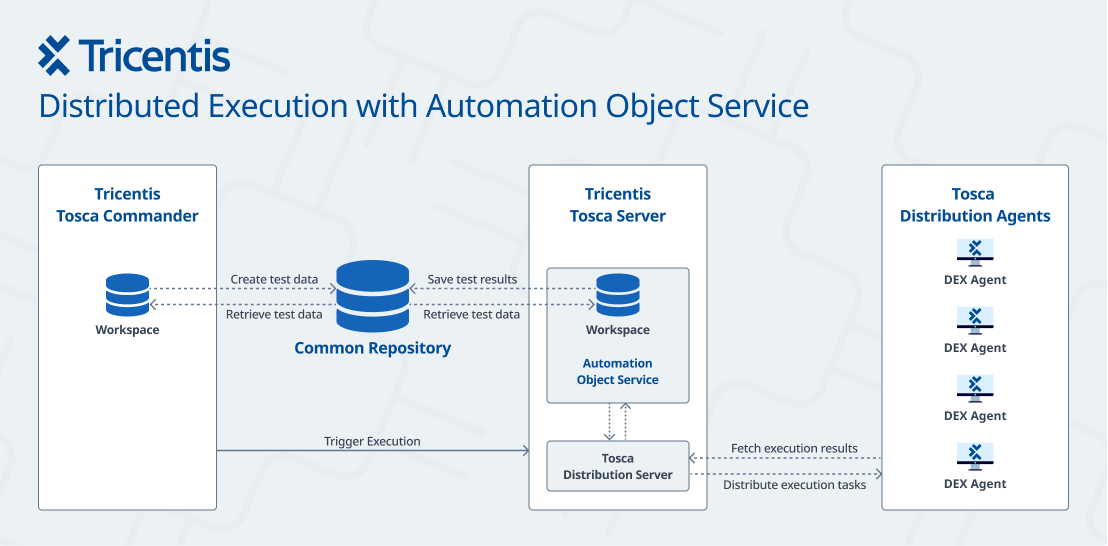
Unattended Execution
Unattended Execution is an important component of Tosca Distributed Execution.
It allows you to run tests even if the Agent screen is locked, without a user logged in to the Agent machine. The Tosca RDP Server runs as a service on the Agent machine, and it connects to itself.
If you have graphical user interface (GUI) tests, you must set up Unattended Execution.
Agent types
Tricentis offers the following Agent types for Tosca Distributed Execution:
-
Execution Agent.
This Agent can only execute TestCases created with Engines 3.0.
-
Agent that is a full client installation of Tosca Commander.
Agents: rights and permissions
Agents execute your tests. To do so, the Agent pretends to be a Windows user. This user needs to have access and the necessary permissions for all applications and files that you want to automate.
For instance, if you want to write data to a Microsoft Excel file, the Agent machine must have Microsoft Excel installed. The user must have access to the directory where the file is located and permission to write to the file.
Or if you want to send emails, you need to ensure that your Agent machines and the mail server are able and allowed to communicate via the specified ports.
What's next
Go over our checklist to see if your environment is ready to install and set up Tosca Distributed Execution: "Distributed Execution checklists & best practices".