Monitor TestEvents and Agents
As of Tricentis Tosca 2026.1 LTS, Distributed Execution is no longer enabled by default. While Distributed Execution is included in both Tosca Commander and Tosca Server installations, it requires manual activation:
-
Tosca Commander: The Distributed Execution Agent option in the installer is disabled by default. You must enable it before starting the Tricentis Tosca installation.
-
Tosca Server: All Distributed Execution related services remain disabled by default. You must enable the DEX Server after the Tosca Server installation.
For detailed information on how to enable the Distributed Execution Agent and DEX Server, check out this Tricentis Knowledge Base article.
The Tosca Distributed Execution (DEX) Monitor is a web-based application that allows you to monitor your Tosca Distributed Execution tests and Agents.
Install the DEX Monitor
The installation of the DEX Monitor is part of the Tosca Server installation you perform when you set up Tosca Distributed Execution. You don't need to perform any additional installation steps once the server installation is complete.
After the installation, you can perform optional configurations as described in "Optional Tosca Distributed Execution Monitor configurations".
Open the DEX Monitor
You can open the DEX Monitor in one of the following ways:
-
In your browser, by entering the address http://<server IP address or hostname of the machine that holds the DEX Monitor>:<port>/Monitor/.
-
Directly from Tosca Commander.
To do so, right-click a TestEvent and select one of the following context menu entries:
Open Event View takes you to the TestEvents overview page.
Open Agent View takes you to the Agents overview page.
Navigate the DEX Monitor
The menu bar on the left side of the screen allows you to switch between views:
-
The Agent View, where you can monitor, recover, configure, and restart your Agents.
-
The Event View, where you can monitor and cancel the execution of your TestEvents.
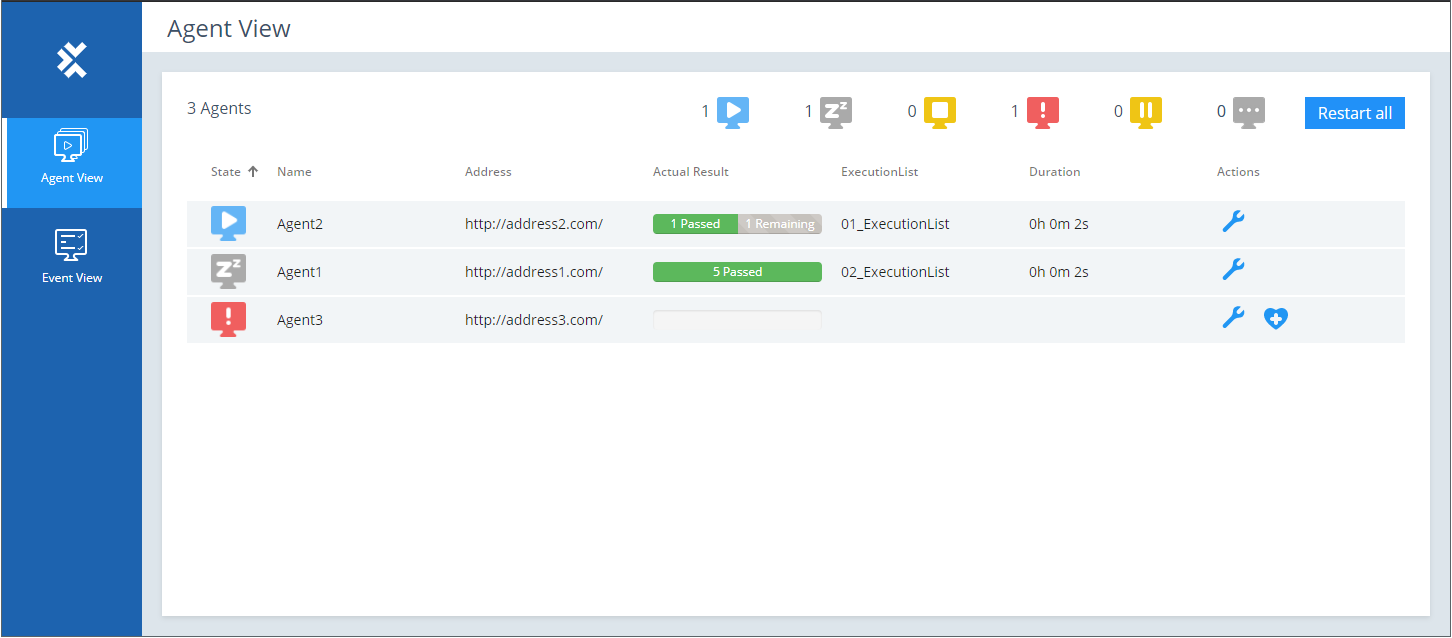
Navigate DEX Monitor
What's next
Get detailed information on how to monitor your TestEvents and Agents with the DEX Monitor: