Resource expressions
A Resource expression is a reference to a resource, i.e. a data structure or an open transmission channel.
To use Resources in your tests, follow the steps below:
-
Load your Resource. You can do so via a Module, for instance with the Open/Create XML file Module, or with a Special Execution Task.
-
In the TestStep you create from the Module, assign a plain-text name to your Resource.
-
Reference this name in other TestSteps with the following syntax:
{RES[MyResource]}
You cannot combine Resource expressions with other expressions.
In the example below, you use a Resource in an API TestCase.
-
The TestStep Open/Create XML was created with the Open/Create XML file Module and loads the file EmtpySettings.xml as a resource with the name MyResource.
In other words, you use this TestStep to assign a name to your Resource and to specify which data structure this name refers to.
-
TestStep Send Request sends the Resource to the webservice as a UTF-8-encoded string.
-
TestStep Verify Response verifies the value in the response message from the webservice.
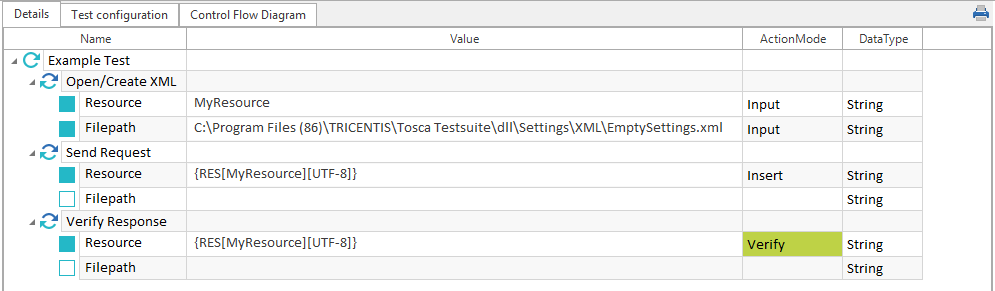
Resource expressions in an API TestCase
Encode Resources
You can convert the content of a Resource to a different format.
To do so, specify one of the following types of encoding:
-
ASCII
-
UTF7
-
UTF8
-
Unicode
-
UTF32
{RES[MyResource][encoding]}
Delete Resources
You can delete Resources, for instance if you only use a specific Resource for a specific TestCase. For information on how to do so, check out "Resource Handling".