Open XML resources
The XML Engine 3.0 allows you to create XML resources in the following ways:
-
Load either an existing XML structure or CData information into the resource.
-
Use the appropriate XModule.
All manipulations are made in resources. You need to save those changes explicitly if you want to transfer them to the connected XML file check out "Save XML files").
Load XML files
Use the Module Open/Create XML file to create an XML file or to load it as a resource.
This Module is part of the Standard subset. You can find it under Standard modules->Engines->XML.
In this example, you load the file books.xml into the resource SampleResource.
{CP[ExampleDirectoryXML]} refers to the file path you defined in the test configuration parameter ExampleDirectoryXML.

Load an XML file
Create XML resources from an existing resource
Use the Module Get XML from Connection to create an XML resource from an existing file resource.
This Module is part of the Standard subset. You can find it under Standard modules->Engines->XML.
The content of the newly created XML resource enables you to perform all XML operations.
In this example, you create a resource from an existing resource.
-
In the first TestStep, you load user.xml into the resource FileResource.
-
In the second TestStep, you write the content of FileResource to NewResource.
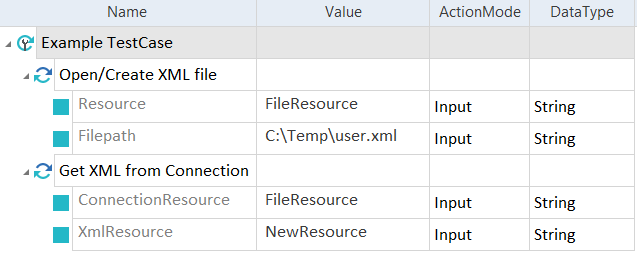
Use an existing resource
Create XML resources
Use the Module Get XML Resource to create an empty XML resource.
This Module is part of the Standard subset. You can find it under Standard modules->Engines->XML.
You can then add XML elements to the resource by using XTestSteps (check out "Adding elements").
In this example, you create the empty resource xmlResource.

Create an empty resource
For an example of how to add elements to this resource, check out "Adding elements".
Open a resource for CData
CData information can be managed in separate files. These files can be loaded during test execution and their contents can be copied to an XML file as a CData element check out "Inserting CData text into XML").
The syntax for this procedure is as follows:
<Filepath to the XML file>\<Name of the CData file>
The CData file CDataExample.txt is loaded into the resource RevisionText.
Parameter {CP[ExampleDirectoryXML]} refers to the file path of the XML file, defined in the test configuration parameter ExampleDirectoryXML.

Open resource for CData