Design the NeoLoad scenario
Start the Selenium scripts
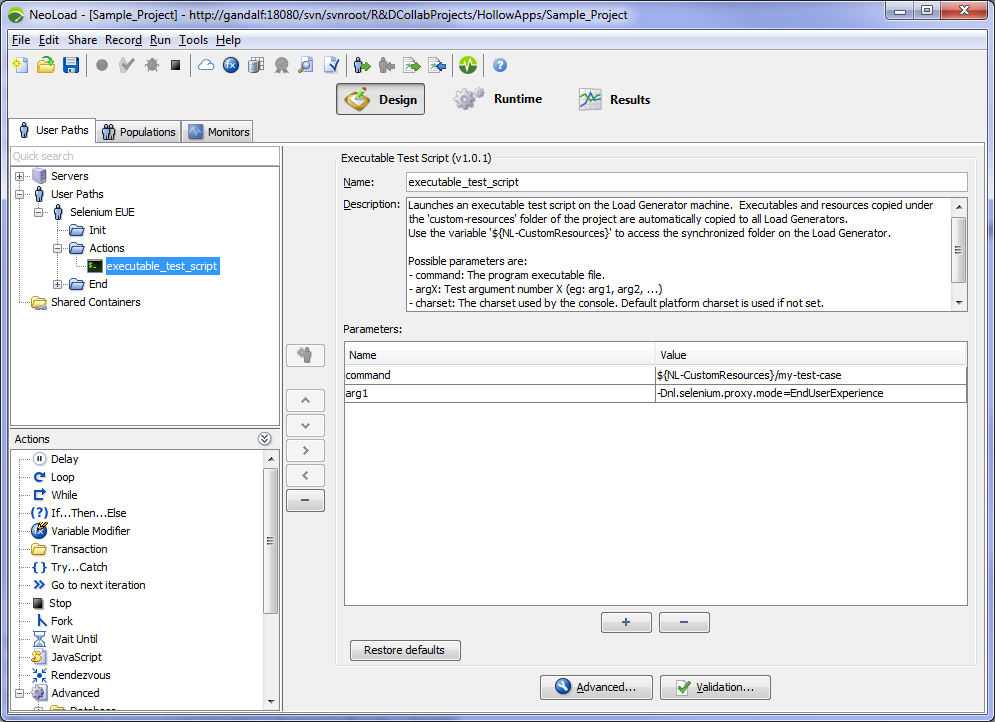
The User Experience scripts of Selenium are started by NeoLoad via the Executable Test Script Advanced action.
For more information about the Executable Test Script Advanced action, please refer to the Executable Test Script Launchers documentation.
The following configuration is required:
-
Command must contain the path of the executable file that was created, either its absolute path or the path relative to the
custom-resourcesfolder in the NeoLoad project:${NL-CustomResources}/my-test-case. -
Attribute arg1 must contain the mode
-Dnl.selenium.proxy.mode=EndUserExperience.
Configure the NeoLoad scenario
To configure your User Experience scenario, follow the guidelines documented in the End User Experience Integration User Guide.
See the results
The external data injected during execution is displayed in Results > Details.
For more information, see by external data.