Signature verification failure report
Vera administrator users can view signatures that failed verification.
Here's how to navigate and interpret the Signature Verification Failure Report:
-
As an administrative user, sign into the Tricentis Vera Web Portal.
-
Navigate to the Signature Verification page within the Tricentis Vera Web Portal.
-
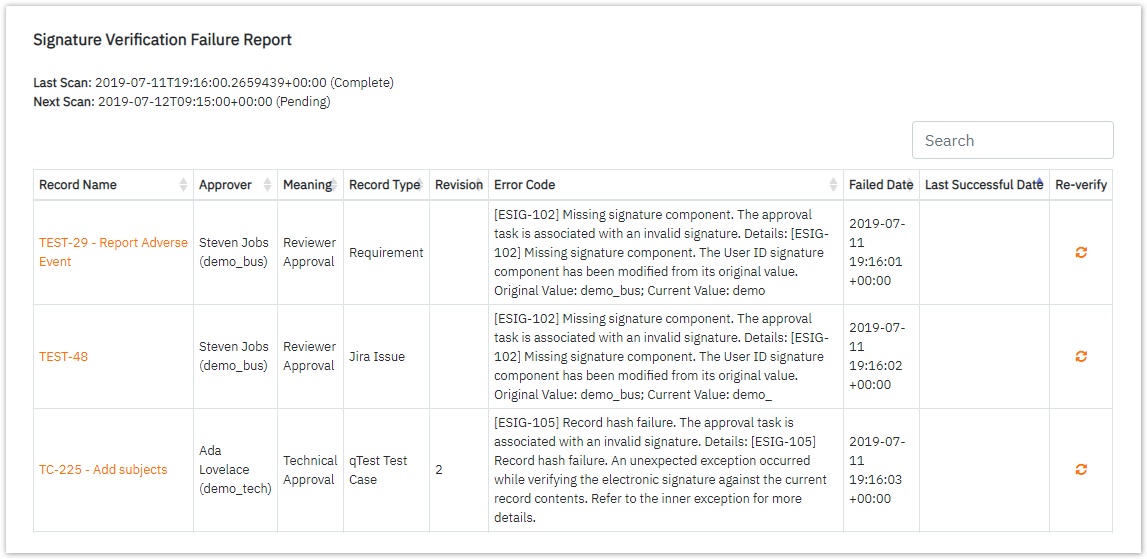
If there are any signatures that failed verification, they are displayed in the Signature Verification Failure Report:
-
The top of the screen displays the Last Scan date-time with its status and the Next Scan date-time with its status.
-
The table is automatically sorted by the Last Successful Date, but can be sorted by any other column.
-
-
To check the verification status of a failed signature, locate the desired signature in the list and click on the corresponding Re-verify icon.
-
If there are no failed signature verification, only the Last Scan and Next Scan date-time statuses are shown.