ランチャー overview
ランチャー lets Tosca Cloud scan applications and run tests on your local machine.ランチャー runs in the background and checks that local components are up to date.
After you install ランチャー, it automatically does these tasks:
-
必要なオートメーションコンポーネントをすべてインストールします
-
コンポーネントを最新の状態に保ちます
-
エージェントを起動し、スキャンを行います
スキャンおよびテストのために、コンポーネントをマニュアルでインストールし、更新する必要はありません。
Tosca Cloud versions and controls ランチャー.This means that Tosca Cloud silently auto-updates ランチャー as necessary.Reinstalling ランチャー also reinstalls all the components it manages.
必要条件
When you install ランチャー, it checks that you have any required software installed.ランチャー prompts you if anything is missing.
詳細については、ハードウェア、ソフトウェア、ブラウザ要件のシステム要件をご確認ください。
アーキテクチャ
The following diagram describes how ランチャー fits into Tosca Cloud's architecture.
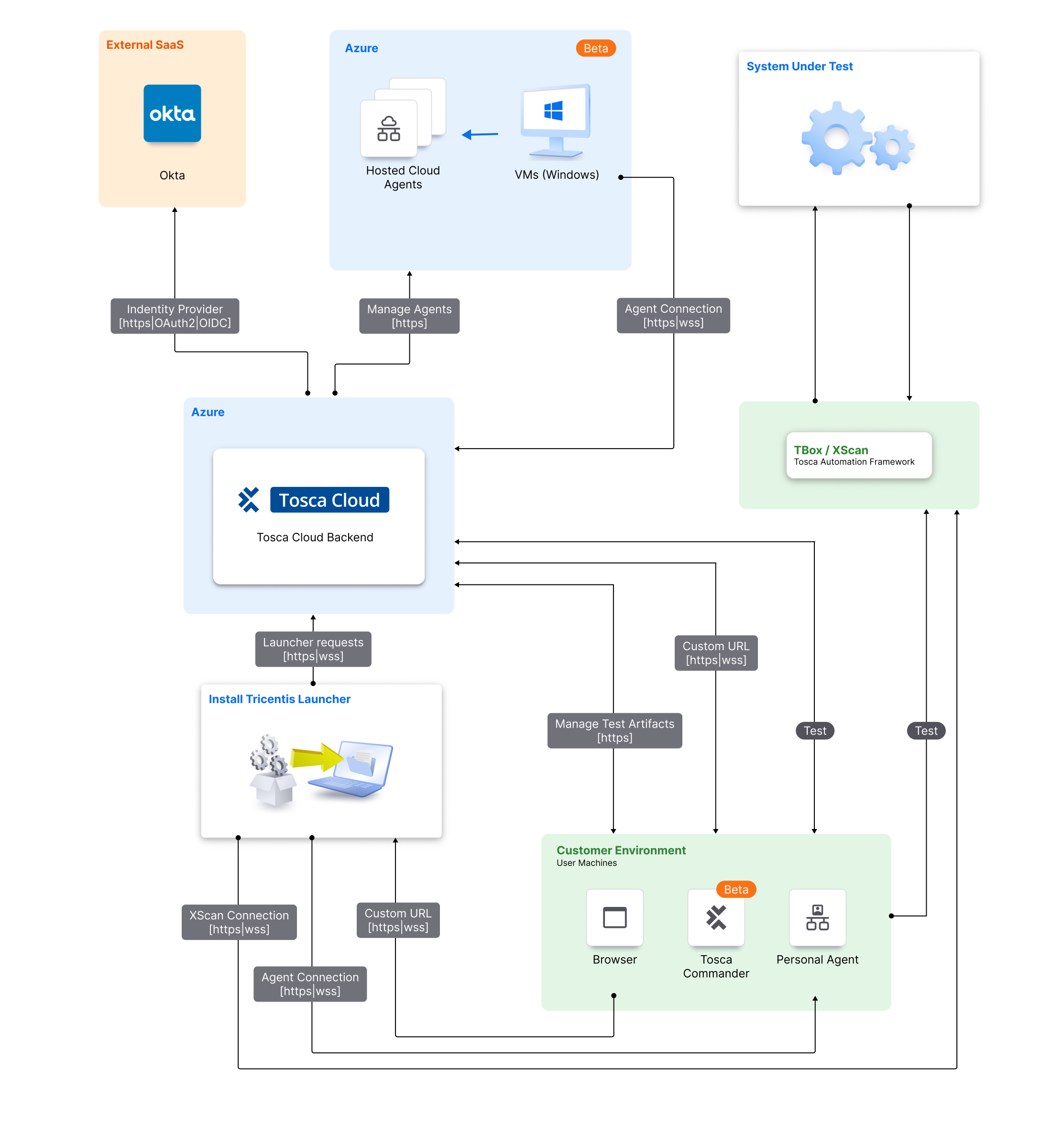
Launcherのアーキテクチャ
セキュリティ
ランチャー's security features protect sensitive data and prevent malicious use.以下に機能についてまとめました。
認証
ランチャー encrypts and stores temporary tokens that let local components authenticate against Tosca Cloud.
Tosca Cloud にログインすると、1時間後に期限切れとなるトークンが作成されます。ランチャー stores these tokens with DPAPI encryption.
パーソナル agents need these tokens to run tests.
チーム agents use locally stored client ID and client secret for authentication.ランチャー uses DPAPI encryption for these credentials.
データ処理
ランチャー doesn't process sensitive data.パーソナル and チーム agents process test data but do not store it.
暗号化
ランチャー uses HTTPS for communication with Tosca Cloud.
セキュリティを更新します
ランチャー downloads signed updates only from verified and trusted sources.
ログおよび監査
ランチャー keeps logs on your local machine for a maximum of 10 days.機密情報のログや保存はしません。ログには、エージェントとオートメーションコンポーネントのインストール、更新、エラー、ステータス情報のみが含まれます。Uninstalling ランチャー doesn't remove logs.
以下の場所でログにアクセスできます。
-
%USERPROFILE%\AppData\Local\Launcher\ for the main log, which includes agent installations and updates.
-
%USERPROFILE%\AppData\Local\SquirrelClowdTemp for updates and installation.
-
%PROGRAMDATA%\TRICENTIS\Logs\E2GAgent\ for the main agents log.
権限とアクセスについて
Any Tosca Cloud user can install and run ランチャー.
Only Tosca Cloud admins can set up チーム agents.