Identify controls by anchors
If you want to make your test automation more reliable and adaptable to UI changes, you can uniquely identify your controls by anchors.
Anchors are controls that work as positional reference, providing context or information about the location of the control you want to identify.
For example, if you copy the text displayed in a Label close to a Textbox to transfer it into the Textbox itself, Tosca first searches for the anchor control (the Label) and then uses its identification criteria as a reference to find, interact with, and identify the selected control (the Textbox).
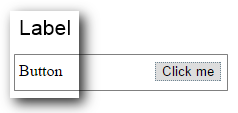
Textbox with Label example
Identify by anchor
To identify a control by anchor, follow these steps:
-
Scan your system under test with Tosca XScan.
-
In the Advanced View, select the control you want to identify.
-
In the Identification methods pane, select ADVANCED IDENTIFICATION > ANCHOR.
-
Choose an anchor in one of the following ways:
-
Drag and drop your anchor control from the tree onto the Anchor Control field.
-
Select Select From Tree View, select an anchor in the tree, and then select Enter.
-
Select Select on Screen, select an anchor control in your application, then use Select on Screen again to confirm.
-
Select Auto Select, if you want Tosca XScan to automatically assign an anchor for your control according to the Relative Algorithm.
-
-
Optionally, choose a different algorithm from the Relative Algorithm dropdown:
-
ShortestPath: Starts the search with the child controls of the anchor, then extends the search to every tree level until it reaches the root element.
-
Coordinate: Uses the coordinates of the anchor to locate a search angle and find the control.
If you stick with the default algorithm Auto, Tosca XScan tries ShortestPath first and then switches to Coordinate if that doesn't work.
-
When you successfully identify a control, the Anchor Control Properties panel shows the anchor's technical properties that Tosca uses to identify the selected control.
Remove anchors
To remove an anchor, right-click the anchor control in the Anchor Control panel and select Remove Anchor.
Relative algorithm
Use the Relative Algorithm to specify the preferred search method:
|
Value |
Description |
|---|---|
|
ShortestPath |
Tosca starts searching for the control starting from the children controls of the anchor, then it extends the search on every tree level until it reaches the root element. |
|
Coordinate |
Tosca uses the coordinates of the anchor control to locate a search angle and find the control. |
|
Auto (default) |
Uses the ShortestPath algorithm by default. If the ShortestPath algorithm was unsuccessful, the system automatically switches to the Coordinate algorithm. |