Import folder structures from Excel
If you use Microsoft Excel to structure automated tests, you can import your tree structure into Tosca Commander.
Requirements
To import your tree structure, your Microsoft Excel sheet must fulfill the following requirements:
-
The objects are hierarchically structured in columns from left to right.
-
Objects of the same hierarchical level are in the same column.
-
The ranking of an element is determined by its relative column position in relation to the element of the previous row.
-
A value in a row describes exactly one element within the superior level. There can only be one value per row.
-
The structure has fewer than 15 levels.
Perform the import
To perform the import into Tosca Commander, follow the steps below:
-
In Microsoft Excel, copy the rows whose structure you want to transfer to Tosca Commander.
-
In Tosca Commander, right-click any folder and select
 Create Folder structure.
Tosca Commander imports the Microsoft Excel data and recreates the tree in the folder that you selected.
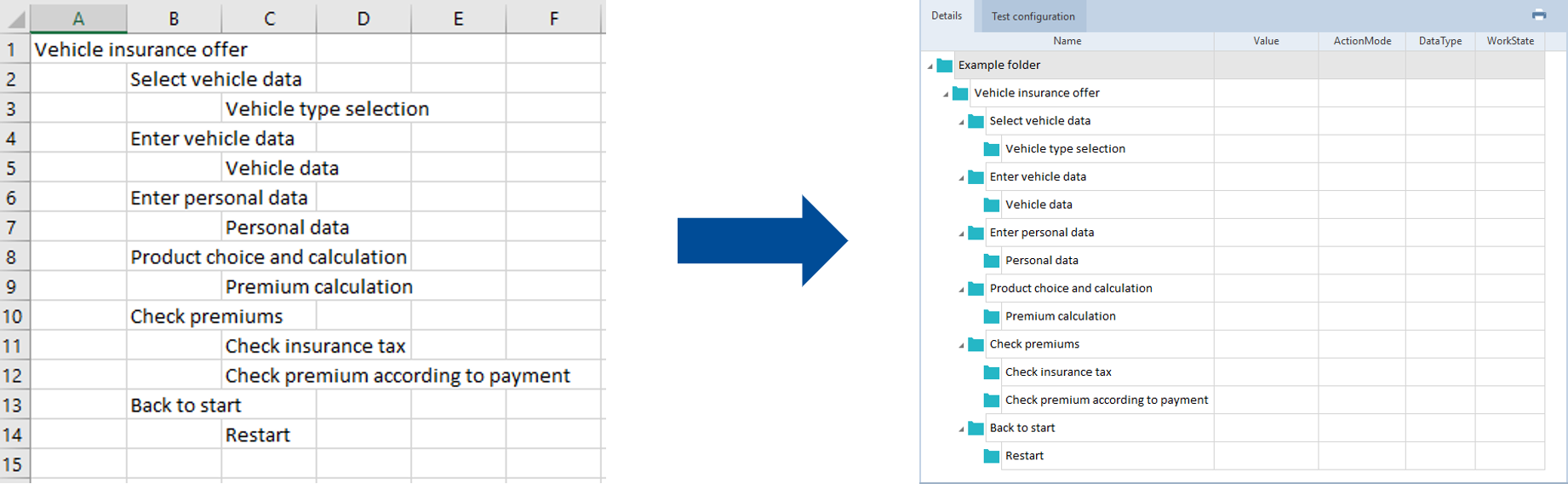
Tree structure in Microsoft Excel → Imported tree structure in Tosca Commander