A TestCase Template must refer to a template that serves as the data source. This allows Tosca to associate the TestSteps with test data.
You can use the following sources to assign test data to your templates:
Use a TestCase-Design Sheet or Class
For information on how to combine TestCase-Design data sources, see the Tosca TestCase-Design AddIn Manual.
Use a Microsoft Excel template
You can use an Excel file as your data source.
By default, Tosca uses the alternative Excel interface to access and read the file in the background. This means you don't need to have Excel installed to use it as a data source. To use this functionality, the Excel file must meet the following requirements:
-
It's an .xlsx or .xlsm file.
-
It has no comments in it. Tosca can't open Excel files that contain comments.
If you want to use an .xls file as a data source, deactivate the alternative Excel interface in Project > Options > General > Advanced. In this case, you must have Excel installed.
Specify the data source
To use an Excel file as a data source, you need to tell Tosca where to find the file:
-
Go to your TestCase Template and expand the Properties pane.
-
In the property SchemaPath, select the ... button in the Value field. This opens the Excel DataSource Wizard dialog, where you select your Excel file and worksheet.
Use file reference as schema definition
You can embed or reference an Excel template as described in "Add attachments". To use such a file as data source for a TestCase template, follow the steps below:
-
In Tosca Commander, select the embedded Excel template that you want to use as data source.
-
Drag and drop the Excel template onto the TestCase template.
-
From the subsequent options, select Assign SchemaDefinition. This opens the Excel DataSource Wizard.
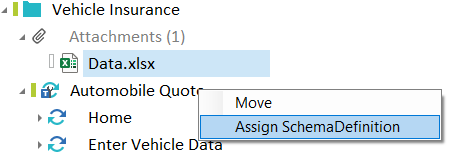
Assign schema definition
-
In the Excel DataSource Wizard, click OK to confirm.