TestData - Delete item
With
-
Independently of your tests, on the Test Data Management page.
-
As part of a TestCase, with the Module TestData - Delete item of the Standard subset. You can find this Module under Standard modules > Test Data Management > Test Data Service.
This topic shows an example of deleting an item as part of a TestCase, using the Module.
Before you start
Double-check with your administrator. If your organization uses access control for test data, you must have write rights to delete items.
Example
In this TestCase called Example TestCase, you want to search for a specific item in the test data repository and then delete it. Specifically, you want to find all red BMWs manufactured between 2015 and 2020, then delete a random entry on that list.
To do so, you perform these actions:
-
To find an item, add the Module TestData - Find & provide item to your TestCase. This Module is also part of the Standard subset, under Standard modules > Test Data Management > Test Data Service.
-
To define the item you're looking for, use the following TestStepValues:
|
TestStepValue |
Description |
|---|---|
|
Existing TDS type |
Value car specifies that you're looking for all items with the TDS type car. |
|
Alias name (item) |
Value mycar specifies mycar as the alias for the item you're looking for and ultimately want to delete. You'll need this alias when you add the delete step. |
|
Start index |
Value 1 specifies that the index count of search results starts at 1, in the first row after the header. This is the default value. |
|
Position |
Value Random specifies that mycar is a random entry on the list of results that Tosca returns based on your data search filters. |
|
Data search filter |
These filters define your search:
|
-
To delete the item, add the Module TestData - Delete item to your TestCase. As the value for TestStepValue Existing alias name (item), enter mycar.
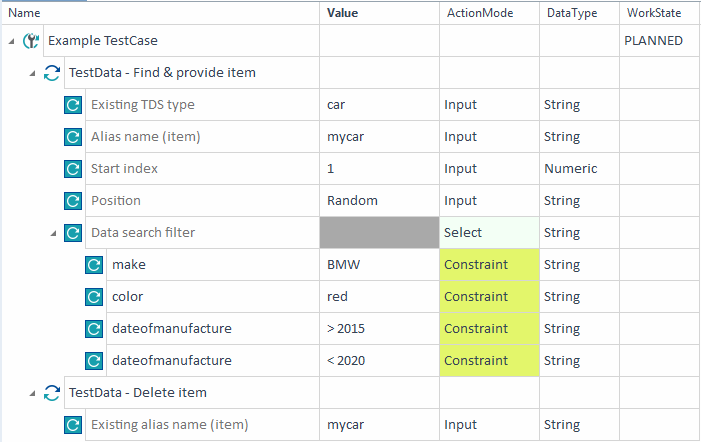
Example TestCase finds an item based on the given specifications and deletes it from the test data repository
When you run the TestCase, the TestStep TestData - Find & provide item finds the item and locks it for you. The TestStep TestData - Delete item deletes the item from the test data repository.