Graphical View
Tosca provides a graphical view for dynamic expressions. This makes reading and understanding the syntax easier, especially for embedded expressions.
The graphical view displays expressions with various shapes and colors:
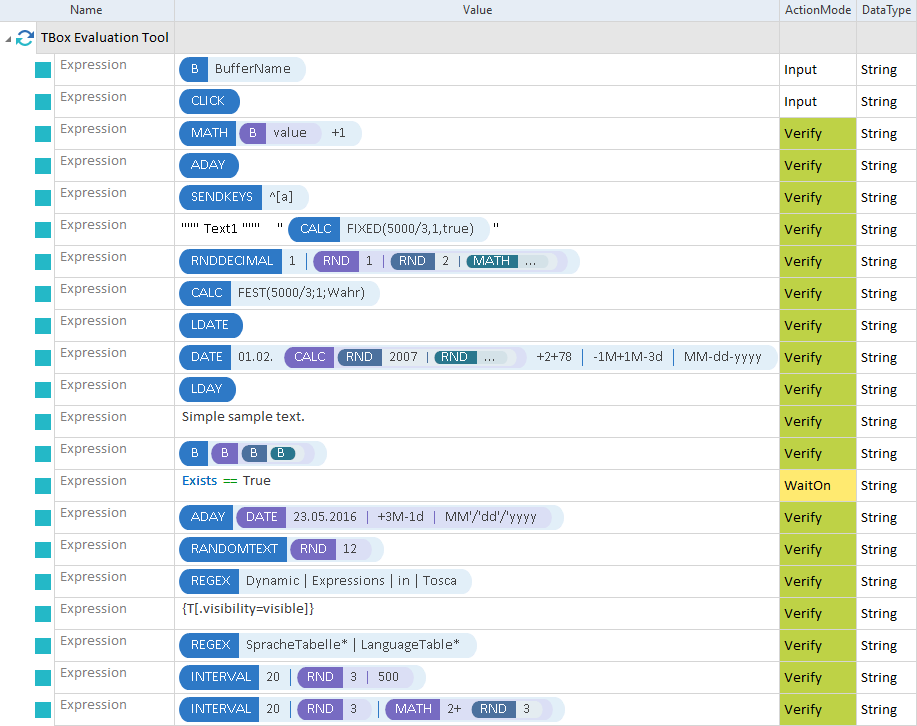
Visualizing dynamic expressions in Tosca
To edit an expression, double-click it.
Tosca does not visualize expressions that contain erroneous syntax.
This format is enabled by default. You can disable it by clicking on the View menu and selecting TestCase->Show Dynamic Expressions (graphical view).
You can also disable visualization by deselecting the checkbox in the Options dialog at Project->Options->View->TestCase->Show dynamic expressions (grapical view).