Display the Test Script name in Tricentis Tosca
Tricentis Tosca provides you with two different ways of displaying the name of the Test Script.
Show Test Script name using Column Chooser
Right-click the column captions to open the Column Chooser and add the BlobID column. The BlobId column displays the name of the Test Script.
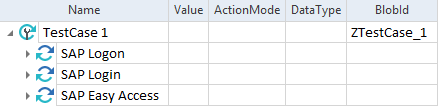
Test Script name in the BlobID column
Show Test Script name by synchronizing
Synchronize the SAP Solution Manager Test Script via the SAP Solution Manager->Synchronize Test Script option in the context menu of the according TestCase. In the subsequent dialog, you can view the script name and modify it if necessary.