Import Requirements from Microsoft Word
If you've already defined Requirements in Microsoft Word, you can import them. No need to recreate your work in Tosca! This topic explains how to prepare and perform the import.
Prepare the import
To import Requirements into Tosca, your Word document must meet the following requirements:
-
You've formatted your headings with the Word styles Heading to Heading 9.
-
You've formatted your headings with the following Multilevel List Word style :
1 Heading 1
1.1 Heading 2
1.1.1 Heading 3, and so on.
Each heading will become a Requirement, and the headings structure determines the Requirements structure in Tosca.
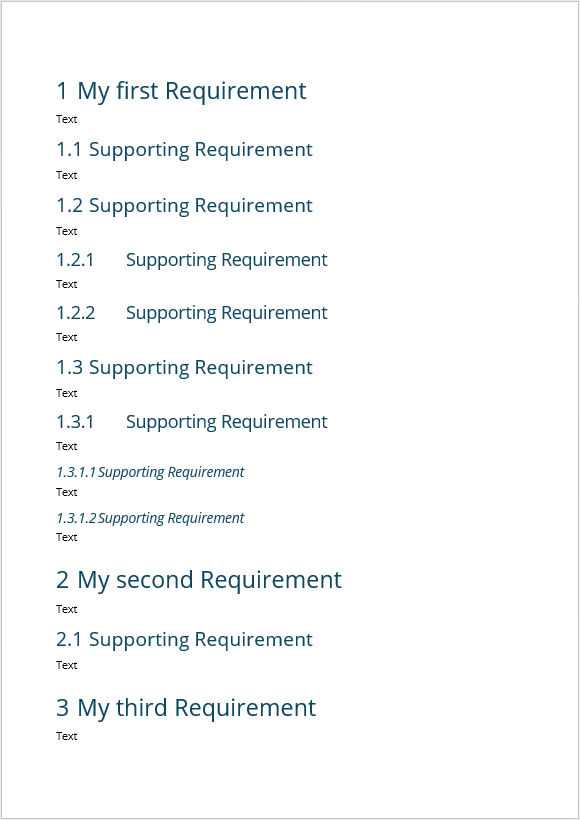
Example Word file showing header structure and formatting
Also, ensure that the value of the setting WordHeadingPrefix at Project > Options > RequirementsManagementAddIn matches the language of your Word installation. By default, the value is Ueberschrift. If you, for example, use Word in English, you have to change the value to Heading.
Perform the import
Importing is easy. Simply right-click a Requirements folder and select Import Requirements from Word captions from the context menu.
Tosca then creates the following objects:
-
A RequirementSet, which has the same name as the Word file.
-
A Requirement for every heading, in the same hierarchy as in the Word file.
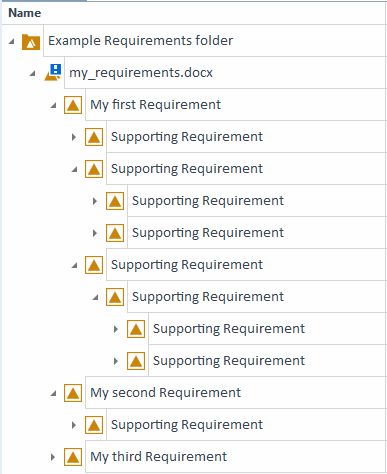
Imported Requirements
What's next
Now that you have your Requirements in Tosca, weight your Requirements to define which of them carry the most business risk.