Create customizations for OSV
Customizations allow you to extend functions that Tosca OSV doesn't support out of the box.
Let's assume that you use a FTP server and want to include it into your tests. By default, OSV doesn't provide the service port type FTP. You can, however, create a custom FTP Connector which creates a new service port type for this protocol in OSV. This customization allows you to virtualize a FTP server and to connect to a real FTP server to forward messages to.
What can you customize?
You can use the following user-specific extensions to customize OSV functions:
|
Functionality |
Description |
Example in OSV |
|---|---|---|
|
Connector (Service Port) |
Connectors serve as service port types. |
HTTP, ActiveMQ, FTP |
|
Transformer |
Transformers allow you to define the message format. |
XML, JSON |
|
Dynamic value |
Dynamic values let you steer Module Attributes during your test activities. |
{DATE}, {MATH[]} |
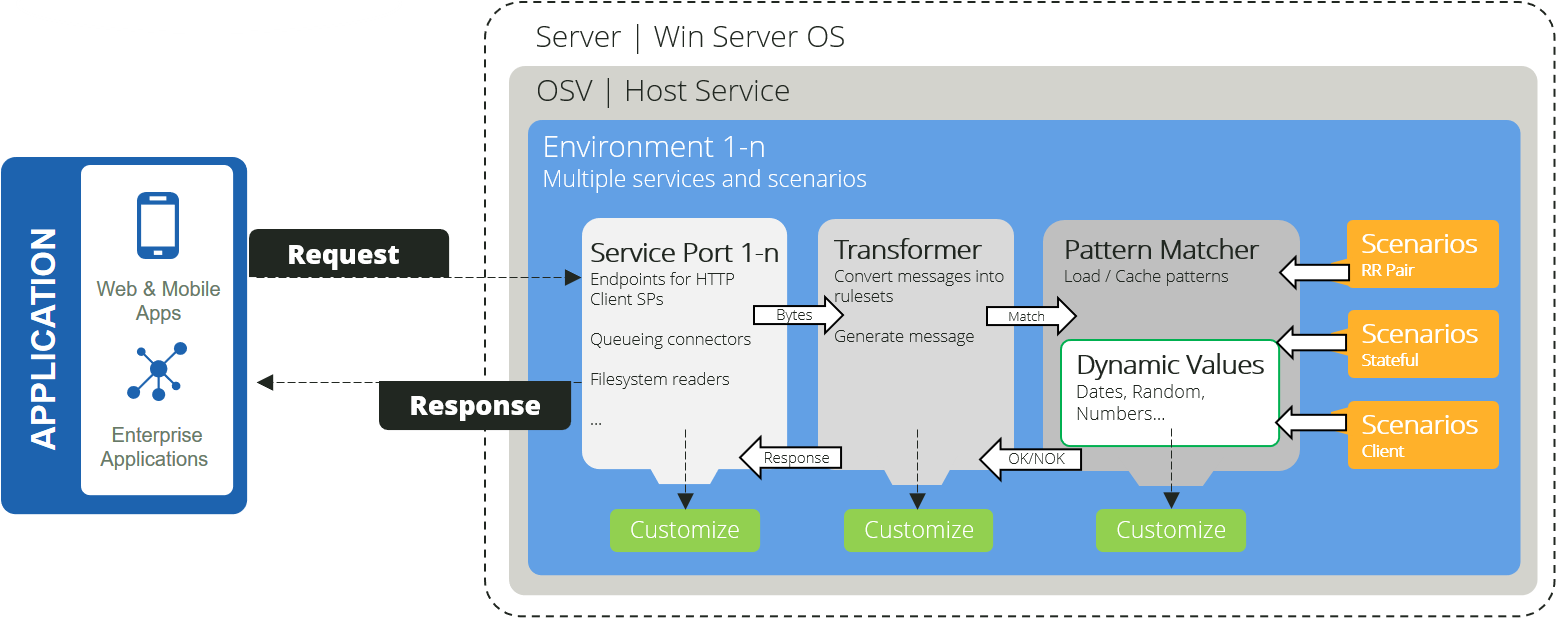
OSV architecture with customizations
How do you enable a customization?
Customizations for OSV are .dll files.
To enable a customization as an extension for OSV, follow these steps:
-
Create the folder <Tosca OSV program files>\Extensions\ if it doesn't already exist.
-
Save your .dll file to this folder.
-
Restart all OSV components.