Receive Mail - Expert
The Receive Mail Expert Module allows you to check whether you received specific emails. This functionality supports Exchange server, POP3 or IMAP protocols only.
This Module is part of the Standard subset. You can find it under Standard modules->Engines->Mail.
If you want to check whether you received a specific, single email, use the Module Receive Mail Simple.
For more information, check out "Receive Mail Expert".
In this example, you check whether you have received specific emails.
To do so, you use the connection SampleConnection that you established earlier (check out "Connect to Mail Server").
The base search criteria are the following:
-
The sender is mark.kim@examplecompany.com.
-
The recipient is lisa.miller@examplecompany.com.
-
The recipient received the email some time within the last year, calculated back from the current date.
Out of all emails that fit these criteria, you are looking for three specific emails.
You also want to check that only three emails match all specified criteria. To do so, you verify the result count.
Email 1 must fulfill the following requirements:
-
The subject line is Test Email 1.
-
The recipient received the email specifically between February 1st, 2020, 8 a.m. UTC and February 10th, 2020, 8 p.m. UTC.
-
amy.wu@examplecompany.com is in Cc.
Furthermore, you want to perform the following actions on Email 1:
-
Save the subject line to a buffer named SubjectLineBuffer.
-
Save all email attachments to C:\Source.
Email 2 must fulfill the following requirements:
-
The subject line is Test Email 2.
-
The message body contains the string This is a test email.
Furthermore, you want to perform the following actions on Email 2:
-
Verify whether the email contains an attachment: TestAttachment.txt.
-
Delete the email.
Email 3 must fulfill the following requirements:
-
This must be the latest email matching the Search Criteria.
-
The subject line is Test Email 3.
Furthermore, you want to perform the following actions on Email 3:
-
Delete the email.
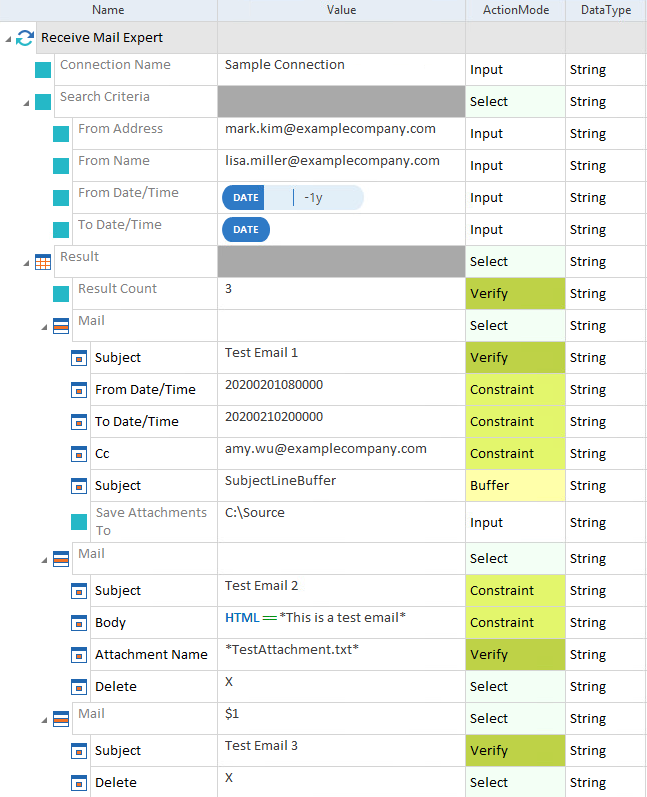
Search for three specific emails