
Tosca Commander user management allows administrators to manage all user-related tasks in Tricentis Tosca.
As a member of the Admins user group, you can create, activate, and deactivate users as well as assign them to user groups and set passwords.
In a multi-user environment, make sure to check out the project root element before you make changes to user management and to check in the project after wards.
Access user management
To access user management, follow the steps below:
-
In Tosca, open the project window via Home->Project.
-
In a multi-user environment, check out the project root element.
-
Select the Usermanagement tab.
Navigate user management
The Usermanagement tab displays a list of all user groups in the project.
The following two groups exist by default and can't be deleted:
-
The Admins group that includes all administrators.
-
The All Users group that includes all users of the project.
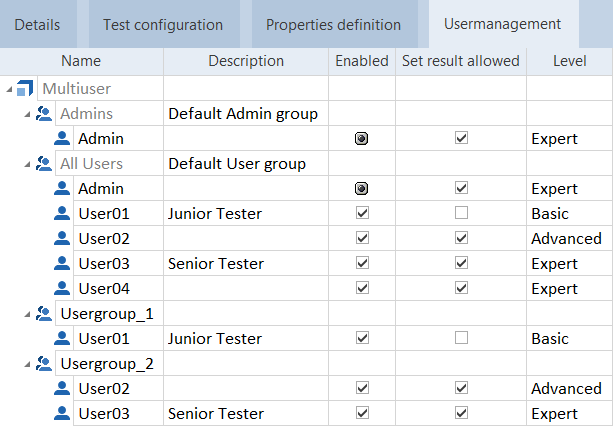
In the Usermanagement tab, you can make the following changes:
-
Enter a description of the user in the Description column.
-
Enable or disable users via the Enabled column.
-
Define whether a user is allowed to set execution results manually in the Set result allowed column.
-
Classify which operations the user can perform in Tosca Commander.