Configure tests - Examples
You can configure your tests by using test configuration parameters to set values. For basic information on the creation of test case parameters and configurations refer to check out "About test configuration parameters".
Example: file paths
An example for test configuration parameters is the definition of program paths in various operating systems. If you want to execute a test using both Windows XP and Windows 7, then various program paths must be stored.
Procedure
-
Create the test configuration parameter Progpath for TestCase Test 3 in the TestCases section. For further information on how to create a test configuration parameter, refer to "Create test configuration parameters ".
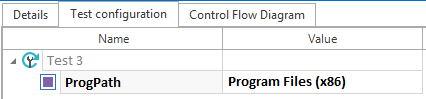
Test configuration parameter in TestCase
-
Use the syntax C:\{CP[Progpath]}\TRICENTIS in the TestStepValue to link this with the configuration parameter Progpath.
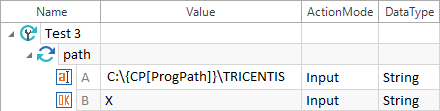
-
Use TestCase Test 3 to create ExecutionLists for every operating system in the ExecutionLists section.
The test configuration parameter is copied to the ExecutionLists.
-
Define the paths of the respective operating systems as values for the test configuration parameters.
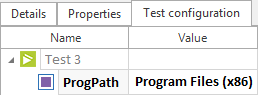
Configuration parameter in the ExecutionList
Example: configure Appium
You can configure your mobile tests with reusable mobile configurations. The Mobile Engine 3.0 automatically creates mobile configurations when you scan a mobile application. However, you can also create mobile configurations manually in the Configurations section. To do so, follow the steps below:
-
In Tosca Commander, go to the Configurations section.
-
Under Mobile, create a new configuration tree (check out "Create configurations").
-
Add mobile TCPs that you want to use to configure your tests. For more information, check out "Configure mobile tests".
The TCPs that you add on higher levels of your configuration tree are automatically inherited by lower levels.
-
Drag and drop the new configuration onto an ExecutionList or a TestCase where you want to use the TCPs you have specified.