TextStream Modules
The folder Engines->TextStream in the Standard subset contains Modules that perform specific tasks for the TextStream Engine 3.0.
TextStream Open/Load
The Module TextStream Open/Load allows you to open a TextStream. Additionally, you can load content from an external source into the TextStream that you specify.
It has the following ModuleAttributes:
|
ModuleAttribute |
Description |
|---|---|
|
Stream Name |
The name of the TextStream which you want to open or load content into. |
|
Load Source Type |
Optionally, you can use this ModuleAttribute to load content from an external source into the specified TextStream. To do so, choose one of the following sources as a value:
|
|
Load Source Identifier |
If you specified the value File or Buffer for the ModuleAttribute Load Source Type, use this to specify the complete path to the file or the buffer name. |
|
Load Operation Type |
The type of operation you want to perform when you load content into the TextStream. You can specify the following operation types as a value for this ModuleAttribute:
|
|
Line Separator |
Line separator setting for the TextStream. You can specify the following line separators, which depend on the Operating System (OS) under test:
|
|
Encoding |
Specify the character encoding to use when you load a file. If you don't specify any value, Tricentis Tosca uses UTF-8 as the default encoding. |
In this example, you perform the following actions:
-
You open and replace the content of a TextStream called TestStream.
-
The source of the new content is an external file, located at C:\Temp\test.txt.
-
You specify that the encoding of the file is Unicode (UTF-32).
-
You replace the content of the TextStream with the Windows line separator setting.
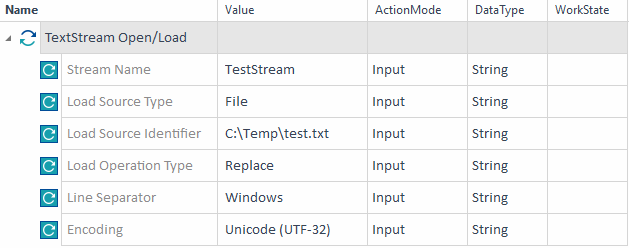
Open a TextStream and load content from an external source
TextStream Save/Close
The Module TextStream Save/Close allows you to close a TextStream and optionally, save its content to an external destination.
It has the following ModuleAttributes:
|
ModuleAttribute |
Description |
|---|---|
|
Stream Name |
The name of the TextStream which you want to close or save. |
|
Destination Type |
The destination where you want to save your TextStream. You can specify the following destinations as a value for this ModuleAttribute:
|
|
Destination Identifier |
If you specified the value File or Buffer for the ModuleAttribute Destination Type, use this to specify the complete path to the file or the buffer name. |
|
Encoding |
Choose a text encoding option from the dropdown menu. The default value is UTF-8. |
|
Keep Stream Open |
Tricentis Tosca closes the TextStream by default. If you want to leave it open after saving, set this value to True. |
In this example, you save the TextStream called TestStream to the system clipboard without closing it.
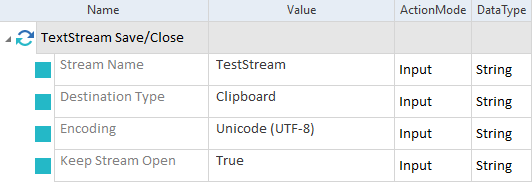
Save the content of a TextStream to an external source
TextStream Block Text Manipulation
The Module TextStream Block Text Manipulation allows you to manipulate the content of a TextStream as a single block of text.
It has the following ModuleAttributes:
|
ModuleAttribute |
Description |
|---|---|
|
Stream Name |
The name of the TextStream which you want to manipulate. |
|
Target Line |
Specifies which line of text to load from the TextStream. You can specify one of the following values:
If you don't specify a Target Line value, Tricentis Tosca uses one of the following defaults based on the Input Operation Type:
|
|
Input Operation Type |
If you use ActionMode Verify for the Content ModuleAttribute , leave the value of this ModuleAttribute empty. If you use ActionMode Input for the ModuleAttribute Content, choose an operation to perform when you insert the specified content into the TextStream. You can specify the following operation types as a value for this ModuleAttribute:
|
|
Field Separator |
Specifies the character that separates your values in your Target Line. For instance, a semicolon (;) is the separator of the following example: <Name>;<Age>;<Country>. This ModuleAttribute is optional. |
|
Line Length |
Specifies the maximum number or characters of the Target Line. This ModuleAttribute is optional. |
|
Total Field Count |
Specifies the number of fields in your TextStream, based on the Field Separator ModuleAttribute. This ModuleAttribute is optional. |
|
Content |
Specifies the text content that you want to steer. Note the following when you specify the content of your TextStream:
Optionally, you can add the following configuration parameters to this ModuleAttribute:
|
In this example, you append new content to the last line of a TextStream called TestStream. It has four different fields, which use a semicolon as a separator.
In the TestStep Block Text Manipulation - Input, you perform the following actions:
-
You insert the Student ID TRIC102-X into the TextStream. The corresponding ModuleAttribute has the following additional configuration parameters:
AlignToRight set to True
Length set to 15
Position set to 1
-
You insert the Student Name Jane Doe into the TextStream. The corresponding ModuleAttribute has the following additional configuration parameters:
Length set to 15
Offset set to 21
Position set to 2
-
You insert the Course Name programming into the TextStream. The corresponding ModuleAttribute has the following additional configuration parameters:
Length set to 20
Offset set to 37
Position set to 3
-
You insert the Course Start Date 01/02/2019 into the TextStream. The corresponding ModuleAttribute has the following additional configuration parameters:
Length set to 10
Offset set to 58
Position set to 4
The steps above produce the following TextStream:

TestStream after manipulation
In the TestStep Block Text Manipulation - Verify, you verify the contents of all fields which you inserted with the previous TestStep.
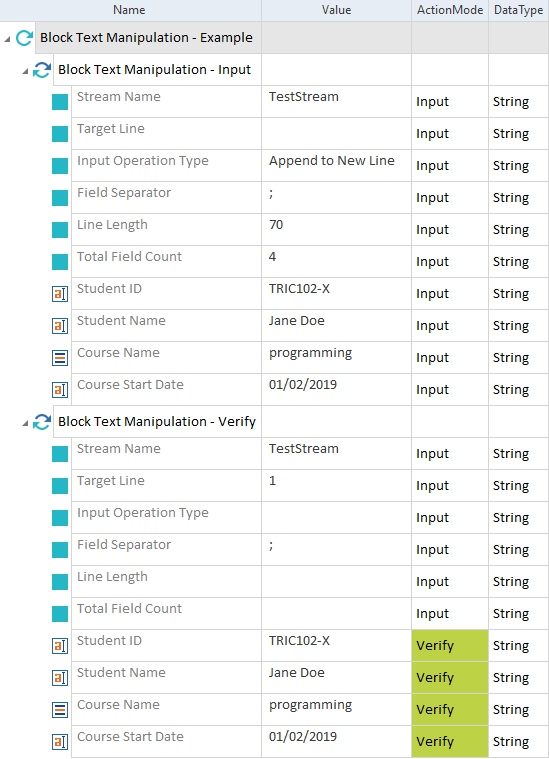
Manipulate the content of a TextStream
TextStream Table Text Manipulation
The Module TextStream Table Text Manipulation allows you to manipulate the content of a TextStream which is formatted as a table.
It has the following ModuleAttributes:
|
ModuleAttribute |
Description |
|---|---|
|
Stream Name |
The name of the TextStream which you want to manipulate. |
|
Start Line |
Line number of the first line of text that you want to load from the TextStream. This ModuleAttribute is optional. |
|
End Line |
Line number of the last line of text that you want to load from the TextStream. This ModuleAttribute is optional. |
|
Input Operation Type |
If you use ActionMode Verify for the ModuleAttribute Content, leave the value of this ModuleAttribute empty. If you use ActionMode Input for the ModuleAttribute Content, choose an operation to perform when you insert the specified content into the TextStream. You can specify the following operation types as a value for this ModuleAttribute:
|
|
Column Definition Value |
The value that specifies the columns of the tabulated text content. You can specify the following column separators as a value for this ModuleAttribute:
|
|
Content |
The table content that you want to steer. |
In this example, you perform the following actions:
-
You replace the tabulated content of a TextStream called TestStream, which separates its columns using a space character.
-
You load the content from lines 1 to 4 and replace the text in the third row of the second column.
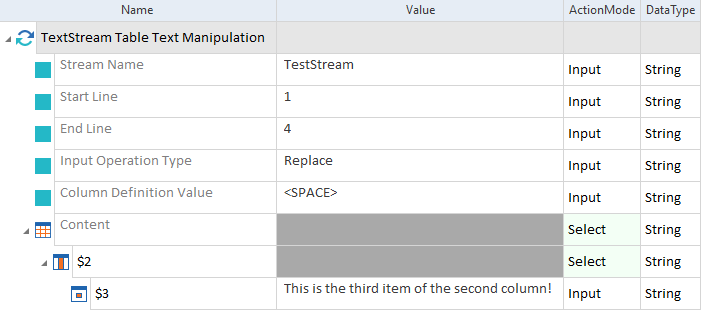
Manipulate tabulated content in TextStream