JSON Modules
The folder Engines->JSON in the Standard subset contains Modules that perform specific tasks for the JSON Engine 3.0.
For examples on how to use these Modules, check out "Structure of JSON TestCases".
Create JSON Resource
The Module Create JSON Resource allows you to create an empty JSON resource. You can add JSON elements to the empty resource in later TestSteps.
The Module has the following ModuleAttribute:
|
ModuleAttribute |
Description |
|---|---|
|
Resource |
Name of the resource that you want to create. |
In this example, you perform the following actions:
-
In the first TestStep, you create the JSON resource emptyJSONResource.
-
In the second TestStep, you use the Module Fill JSON Resource to add JSON elements to the resource.
This Module is a scanned Module and not part of the Standard subset.
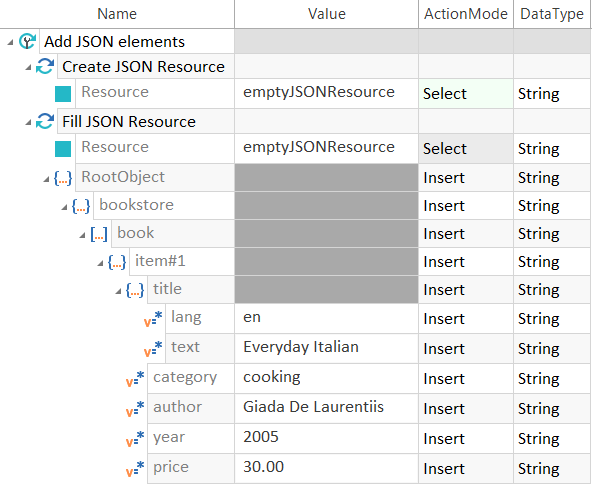
Create and fill a JSON resource
Open/Create JSON file
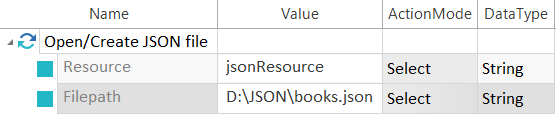
The Module Open/Create JSON file allows you to perform the following actions:
-
Load a JSON file as a resource.
-
Create a new JSON file.
The Module has the following ModuleAttributes:
|
ModuleAttribute |
Description |
|---|---|
|
Resource |
Name of the resource that you want to create. |
|
Filepath |
Full file path to the JSON file, including the file name and extension. |
Save JSON Resource
If you make any changes to a JSON resource during your tests, use the Module Save JSON Resource to save these changes to the JSON file.
The Module has the following ModuleAttributes:
|
ModuleAttribute |
Description |
|---|---|
|
Resource |
Name of the resource whose content you want to save. |
|
Filepath |
Specify a different file where you want to save the changes to the resource. This ModuleAttribute is optional. If you leave the Value empty, the JSON Engine 3.0 saves the changes to the JSON file that's connected to the resource. |
In the example above, you created the resource jsonResource from the file books.json.
In this example, you save any changes that you made to the resource to the file books.json.
Since the Value for Filepath is empty, the JSON Engine 3.0 saves the changes to the file from which you originally loaded the resource.
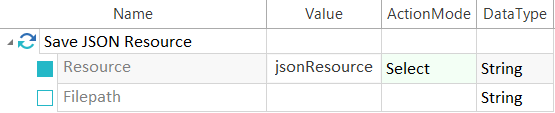
Save a JSON resource
In this example, you save all changes that you made to the resource jsonResource to the file books_new.json.
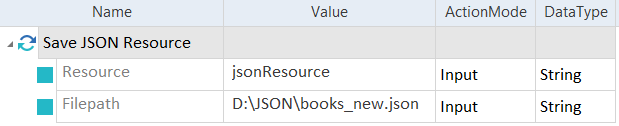
Save a JSON resource to a different file
JSON Schema Validation
The Module JSON Schema Validation allows you to validate a JSON file against a JSON schema file.
The Module has the following ModuleAttributes:
|
ModuleAttribute |
Description |
|---|---|
|
Path to JSON |
Absolute path to the JSON file you want to validate. |
|
Path to schema |
Absolute path to the JSON schema file. |
In this example, you validate the JSON file simple.json against the schema file simple.schema.json.

Validate a JSON file against schema