Use the Home menu
Use the Tosca OSV Monitor Home menu to work with your OSV Environments, Scenarios, and messages.
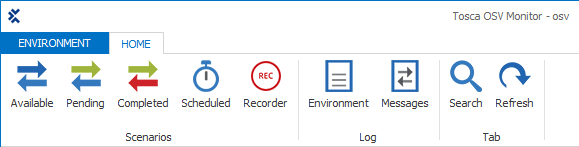
Tosca OSV Monitor Home menu
The Home menu offers the following options:
|
Option |
Description |
|---|---|
|
|
Open the Available Scenarios tab (check out "Start available Scenarios"). |
|
|
Open the Pending Scenarios tab (check out "Check pending Scenarios"). |
|
|
Open the Completed Scenarios tab (check out "Display completed Scenarios"). |
|
|
Open the Scheduled Messages tab (check out "Trigger scheduled messages"). |
|
|
Open the Recorder tab (check out "Record messages"). |
|
|
Open the Environment log (check out "Check the Environment Log"). |
|
|
Open the Messages log (check out "Check the Messages Log"). |
|
|
Show the search field above of the column header. |
|
|
Updates your view. |


