Using XSD elements and value ranges
This chapter describes how XSD elements, attributes and value ranges are interpreted based on examples.
All
All elements that are contained in an All declaration are copied as XModuleAttributes to the XModule.
<xs:schema xmlns:xs="http://www.w3.org/2001/XMLSchema">
<xs:complexType name="personType">
  <xs:all>
    <xs:element name="firstname" type="xs:string"/>
    <xs:element name="lastname" type="xs:string"/>
  </xs:all>
</xs:complexType>
<xs:element name="person" type="personType"/>
</xs:schema>
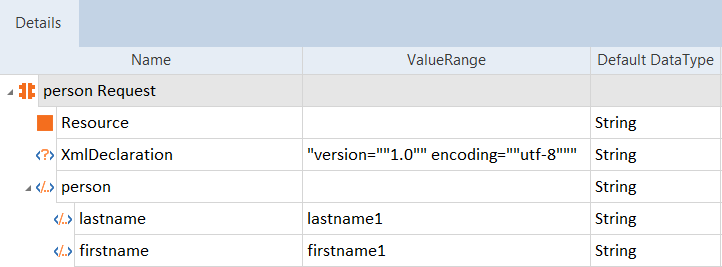
Scan result - All
Choice
Choice declarations contain an arbitrary number of elements, but only one element can be used at a time from a choice declaration.
<xs:schema xmlns:xs="http://www.w3.org/2001/XMLSchema">
<xs:complexType name="person">
  <xs:choice>
    <xs:element name="employee" type="xs:string"/>
    <xs:element name="member" type="xs:string"/>
  </xs:choice>
</xs:complexType>
<xs:element name="user" type="person"/>
</xs:schema>
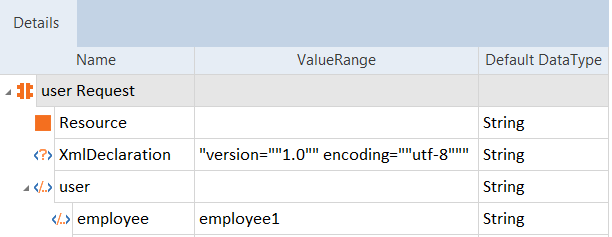
Scan result - choice
ComplexContent
An XModule is created for each complexType element. The declaration complexContent either extends or a restricts these Modules.
In the example below, the element employee copies the elements firstname and lastname from the complexType element personinfo and adds the following elements: address, city and country.
<xs:schema xmlns:xs="http://www.w3.org/2001/XMLSchema">
  <xs:element name="employee" type="fullpersoninfo"/>
  <xs:complexType name="personinfo">
    <xs:sequence>
      <xs:element name="firstname" type="xs:string"/>
      <xs:element name="lastname" type="xs:string"/>
    </xs:sequence>
  </xs:complexType>
  <xs:complexType name="fullpersoninfo">
    <xs:complexContent>
      <xs:extension base="personinfo">
        <xs:sequence>
          <xs:element name="address" type="xs:string"/>
          <xs:element name="city" type="xs:string"/>
          <xs:element name="country" type="xs:string"/>
        </xs:sequence>
      </xs:extension>
    </xs:complexContent>
  </xs:complexType>
</xs:schema>
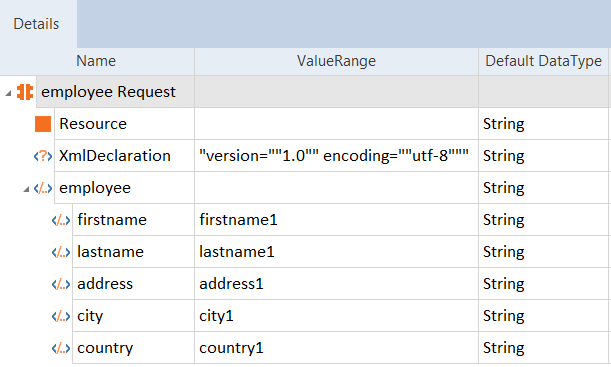
Scan result - complexContent
Enumeration
The elements of an enumeration are copied as value ranges of XModuleAttributes, but only one element can be used at a time from an enumeration declaration.
<xs:schema xmlns:xs="http://www.w3.org/2001/XMLSchema">
  <xs:element name="car">
    <xs:simpleType>
      <xs:restriction base="xs:string">
        <xs:enumeration value="Audi"/>
        <xs:enumeration value="Golf"/>
        <xs:enumeration value="BMW"/>
      </xs:restriction>
    </xs:simpleType>
  </xs:element>
</xs:schema>
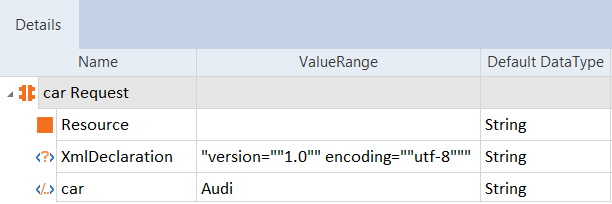
Scan result - enumeration
Group
Group declarations contain an arbitrary number of elements which are copied as XModuleAttributes.
<xs:schema xmlns:xs="http://www.w3.org/2001/XMLSchema">
<xs:complexType name="custGroup">
<xs:group name="custGroup">
  <xs:sequence>
    <xs:element name="customer" type="xs:string"/>
    <xs:element name="orderdetails" type="xs:string"/>
    <xs:element name="billto" type="xs:string"/>
    <xs:element name="shipto" type="xs:string"/>
  </xs:sequence>
</xs:group>
<xs:complexType name="ordertype">
  <xs:group ref="custGroup"/>
  <xs:attribute name="status" type="xs:string"/>
  </xs:complexType>

<xs:element name="orders" type="ordertype"/>

</xs:schema>
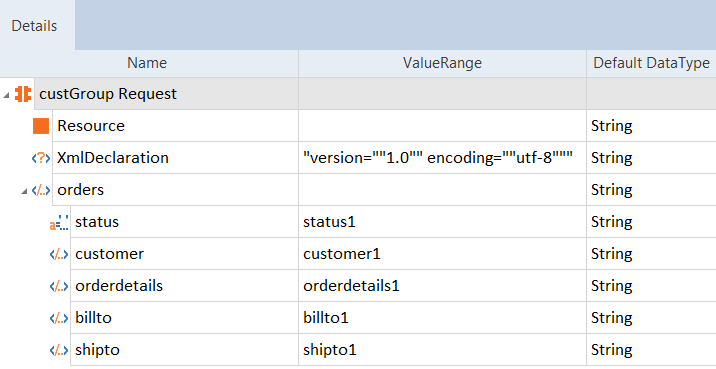
Scan result - group
List
List elements are copied as XModuleAttributes. Lists can be tuples of integers or of strings. The items of these lists are separated by spaces.
<xs:schema xmlns:xs="http://www.w3.org/2001/XMLSchema">
<xs:element name="intvalues" type="valuelist"/>
<xs:simpleType name="valuelist">
  <xs:list itemType="xs:integer"/>
</xs:simpleType>
</xs:schema>
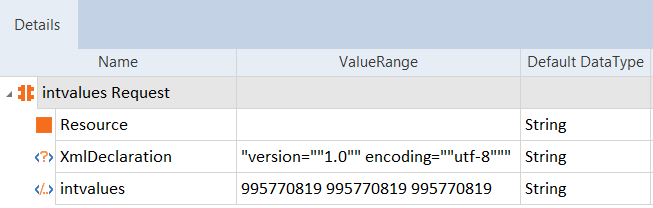
Scan result - list of integers
<xs:schema xmlns:xs="http://www.w3.org/2001/XMLSchema">
<xs:element name="stringvalues" type="valuelist" />
<xs:simpleType name="valuelist">
  <xs:list itemType="xs:string"/>
</xs:simpleType>
</xs:schema>
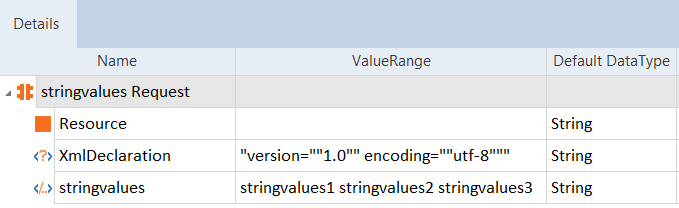
Scan result - list with strings
minOccurs / maxOccurs
The elements minOccurs and maxOccurs are copied as a Cardinality property to the XModuleAttribute. Possible values: 0-1, 1, 0-unbounded (0-N) and 1-unbounded (1-N).
<xs:schema xmlns:xs="http://www.w3.org/2001/XMLSchema">
<xs:element name="persons">
 <xs:complexType>
   <xs:sequence>
     <xs:element name="person" maxOccurs="unbounded">
       <xs:complexType>
         <xs:sequence>
           <xs:element name="full_name" type="xs:string"/>
           <xs:element name="child_name" type="xs:string" minOccurs="0" maxOccurs="unbounded"/>
         </xs:sequence>
       </xs:complexType>
     </xs:element>
   </xs:sequence>
 </xs:complexType>
</xs:element>
</xs:schema>
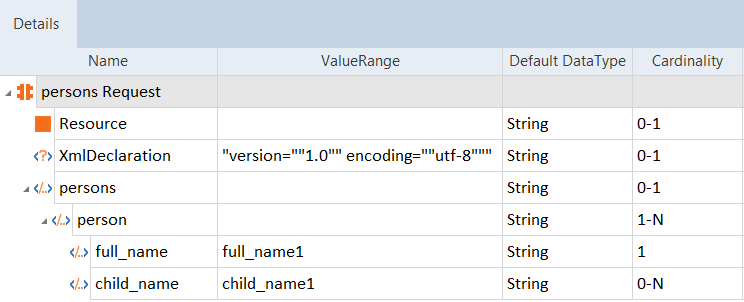
Scan result - minOccurs/maxOccurs
Pattern
Pattern declarations contain the exact sequence of possible characters. The following example defines an element called gender with a restriction. The only acceptable value is male or female:
<xs:schema xmlns:xs="http://www.w3.org/2001/XMLSchema">
  <xs:element name="gender">
    <xs:simpleType>
      <xs:restriction base="xs:string">
        <xs:pattern value="male|female"/>
     </xs:restriction>
    </xs:simpleType>
  </xs:element>
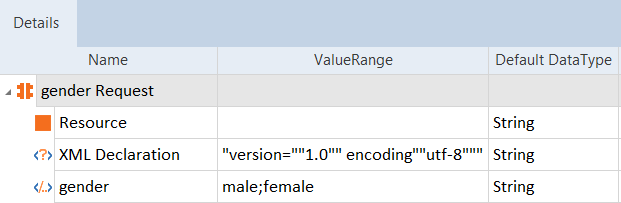
Scan result - Pattern
Additional examples for Pattern value:
|
Pattern elements |
Result |
|---|---|
|
[a-z] |
The only acceptable value is ONE lowercase letter from a to z. |
|
[A-Z][A-Z][A-Z] |
The only acceptable value is THREE uppercase letters from a to z. |
|
[a-zA-Z][a-zA-Z][a-zA-Z] |
The only acceptable value is THREE lowercase OR uppercase letters from a to z. |
SimpleContent
The simpleContent element is copied as an XModuleAttribute.
<xs:schema xmlns:xs="http://www.w3.org/2001/XMLSchema">
  <xs:complexType name="shoesizeType">
    <xs:simpleContent>
      <xs:extension base="xs:integer">
        <xs:attribute name="country" type="xs:string" />
      </xs:extension>
    </xs:simpleContent>
  </xs:complexType>
<xs:element name="shoesize" type="shoesizeType" />
</xs:schema>
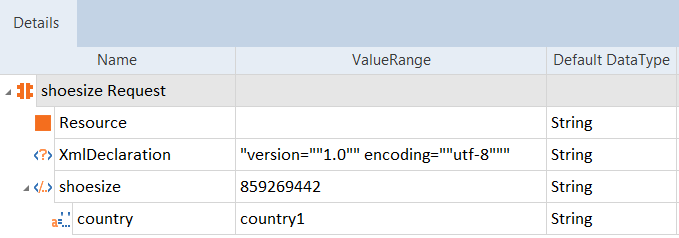
Scan result - simpleContent
Type
XSD types are copied as data types to an XModuleAttribute. The table below lists all XSD types that will be considered. The DataType Boolean also transfers the values true and false to the XModuleAttribute as ValueRange.
|
XSD Type |
Tosca DataType |
|---|---|
|
boolean |
Boolean |
|
byte |
Numeric |
|
date |
Date |
|
dateTime |
String |
|
decimal |
Numeric |
|
duration |
String |
|
gDay |
Date |
|
gMonth |
Date |
|
gMonthDay |
Date |
|
gYear |
Date |
|
gYearMonth |
Date |
|
int |
Numeric |
|
integer |
Numeric |
|
negativeInteger |
Numeric |
|
nonNegativeInteger |
Numeric |
|
nonPositiveInteger |
Numeric |
|
positiveInteger |
Numeric |
|
short |
Numeric |
|
string |
String |
|
time |
String |
|
unsignedByte |
Numeric |
|
unsignedInt |
Numeric |
|
unsignedLong |
Numeric |
|
unsignedShort |
Numeric |
<xs:schema xmlns:xs="http://www.w3.org/2001/XMLSchema">
  <xsd:complexType name="addressType">
    <xsd:sequence>
      <xsd:element name="postal" type="xsd:int"/>
      <xsd:element name="city" type="xsd:string"/>
      <xsd:element name="street" type="xsd:string"/>
      <xsd:element name="streetNumber" type="xsd:int"/>
      <xsd:element name="doorNumber" type="xsd:string"/>
    </xsd:sequence>
  </xs:complexType>
</xs:schema>
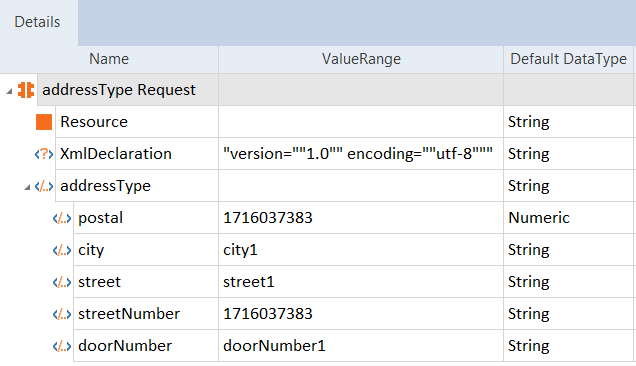
Scan result - type
In the ModuleAttribute, the configuration parameter TargetDateFormat is created for the DataType Date. This parameter contains the respective date format as value.
|
XSD Type |
DataType |
Date format |
|---|---|---|
|
date |
Date |
yyyy-MM-dd |
|
gDay |
Date |
dd |
|
gMonth |
Date |
MM |
|
gMonthDay |
Date |
MM-dd |
|
gYear |
Date |
yyyy |
|
gYearMonth |
Date |
yyyy-MM |
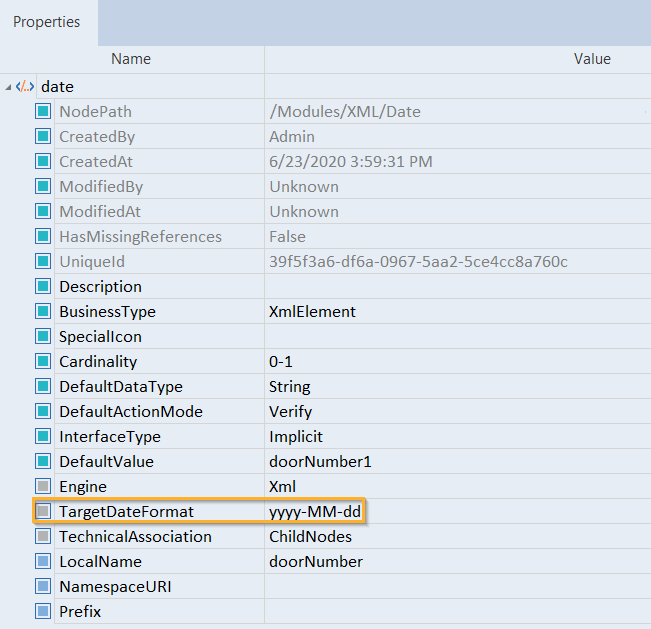
Configuration parameter for the XSD type date