Linking several XSD files
There are three ways to link XSD files with each other.
Import and include
One or more XSD files can be imported or integrated into the target schema by using the elements import or include.
Redefine
Extended classes can be newly defined as a basis. In this case, definitions of an already existing XSD file are used for defining a new schema. The basic schema is marked with a hash code in the Tosca Commander™ Module name.
Example
In the example below, MySchema2.xsd is created and schema Myschema1.xsd is used as a basis. A new Module named Myschema2 including the element author is created.
<!--Myschema1.xsd-->
<xs:schema xmlns:xs="http://www.w3.org/2001/XMLSchema">
  <xs:complexType name="pname">
    <xs:sequence>
      <xs:element name="firstname"/>
      <xs:element name="lastname"/>
    </xs:sequence>
  </xs:complexType>
  <xs:element name="customer" type="pname"/>
</xs:schema>
<!--Myschema2.xsd-->
<xs:schema xmlns:xs="http://www.w3.org/2001/XMLSchema">
<xs:redefine schemaLocation="Myschema1.xsd">
<xs:complexType name="pname">
<xs:complexContent>
<xs:extension base="pname">
<xs:sequence>
<xs:element name="country"/>
</xs:sequence>
</xs:extension>
</xs:complexContent>
</xs:complexType>
</xs:redefine>
<xs:element name="author" type="pname"/>
</xs:schema>
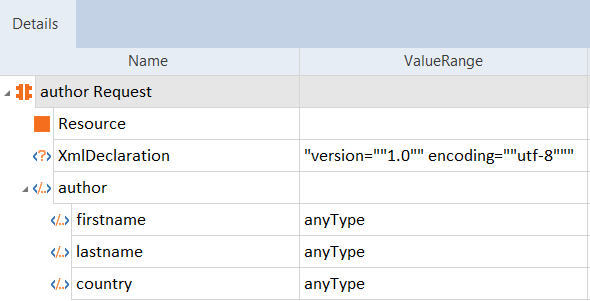
Scan result - redefine