Steer PuTTY Engine 3.0 controls
You can steer the following standard controls with the PuTTY Engine 3.0:
For information on how to create Modules using these controls, check out "Create PuTTY Modules".
Limitations
Note the following restrictions for steering PuTTY controls:
-
PuTTY applications don't support cursor positioning. When you steer TextBoxes with ActionMode Input, Tricentis Tosca places the text in the currently active position in the terminal.
-
PuTTY applications don't support table manipulation. When you steer Tables, you can't use ActionMode Input.
-
When you steer your PuTTY application, make sure that the window size is the same as when you scanned it.
-
PuTTY doesn't detect passwords. When you send passwords over PuTTY, use DataType Password to protect them.
-
Use an English keyboard layout in PuTTY to ensure special characters send as expected.
Control steering
If you use these special characters {,+, ^, %, ~, (), [], you need additional escaping. To do so, surround the special characters with curly braces {}. For more information on how to work with special characters, see chapters "Special characters" and "Keyboard commands".
| Tosca Input | PuTTY Output |
|---|---|
| "{{}Hello{}}" | {Hello} |
In this example, you use a TestCase to perform the following actions:
-
TestStep PuTTY - Wait for text steers the control type Label. It waits until a message which contains the word done appears. To do so, it uses wildcards before and after the word done.
-
Once the message appears, TestStep PuTTY - Input steers the control type TextBox. It sends the command exit, followed by ENTER.
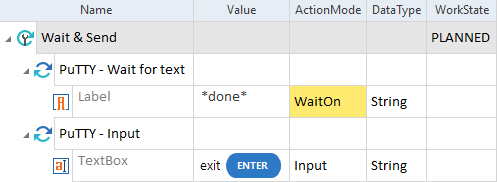
Wait for a message before sending a command to the PuTTY application
In this example, you steer the control type TextBox to sign in to a PuTTY application.
You send the username and an encrypted password, each followed by ENTER.
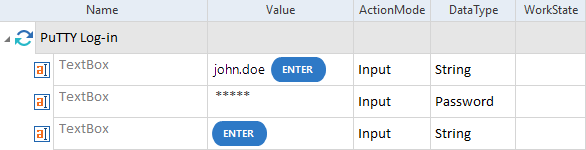
Send commands to a PuTTY terminal window
In this example, you steer the control type Table to verify whether the content of the first cell in the second row of a PuTTY table is Budapest.
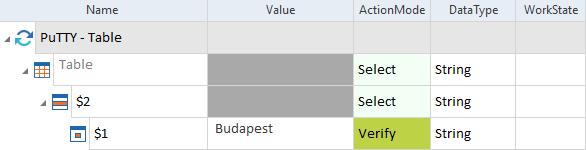
Verify the content of a table in the PuTTY terminal