Steer Oracle controls
With the Oracle Engine 3.0, you can steer controls in Oracle Fusion applications.
This table lists all Oracle Fusion controls that you can steer:
|
Business name of Oracle controls |
Identified in Tosca as |
|---|---|
|
CommandButton, Button, GoButton, CommandToolbarButton |
|
|
InputDate, InputText, InputComboboxListOfValues |
|
|
SelectBooleanCheckbox |
|
|
Table |
|
|
SelectOneChoice |
|
|
Label |
|
|
Menu, GoMenuItem |
|
|
Icon, Image |
|
|
Link, GoLink, CommandImageLink, CommandLink |
|
|
SelectBooleanRadio, SelectOneRadio |


Additionally, you can steer the following control with the help of a Module from the Standard subset:
|
Business name of Oracle controls |
Standard Module |
|---|---|
|
InputSearch |
Oracle InputSearch
Oracle InputSearch is a control that works as a search bar in your Oracle application. When you enter any text into the search bar, it displays matching search results under the search term you entered.
To steer this control with Tricentis Tosca, use the Module Oracle InputSearch. This is part of the Standard subset, and you can find it under Standard modules->Engines->Oracle.
In this example, you use the Module Oracle InputSearch to perform the following actions on an InputSearch control:
-
It uses the property Label to find the control to steer.
-
It enters the text Brazil into the control.
-
It waits 100ms.
-
It selects the first entry from the search results.
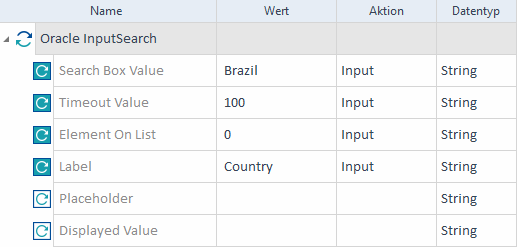
Example for Oracle InputSearch