Receive Mail - Simple
The Receive Mail Simple Module allows you to check whether you received a specific, single email. This functionality supports Exchange server, POP3 or IMAP protocols only.
This Module is part of the Standard subset. You can find it under Standard modules->Engines->Mail.
If you want to check the receipt of multiple emails, use the Module Receive Mail Expert.
In this example, you check whether you have received a specific, single email with the following content: "Congratulations on your research grant".
To do so, you use the connection SampleConnection that you established earlier (check out "Connect to Mail Server").
The base search criteria are the following:
-
The sender is mark.kim@examplecompany.com.
-
The recipient is lisa.miller@examplecompany.com.
-
The recipient received the email between July 1st, 2019, 6 a.m. UTC and August 1st, 2019, 8 p.m. UTC.
For this, you first have to define ToscaDateFormat as follows. For more information check out "Settings - Dynamic Temporal Expressions".

Define ToscaDateFormat
Out of all emails that fit these criteria, you are looking for the one that fulfills the following requirements:
-
The subject line is Research requirements.
-
It has an attachment: specifications.pdf.
Once the Mail Engine 3.0 has found the email, you want to perform the following actions:
-
Verify whether the message body contains the string "Congratulations on your research grant".
-
Write the name of all email attachments to the Buffer AttachmentsResearch.
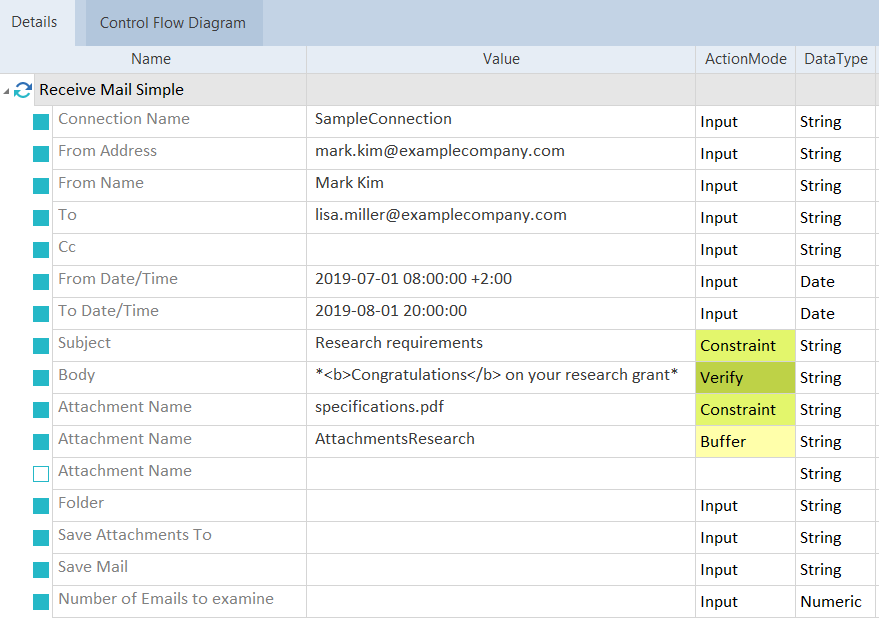
Search for an email with formatted content
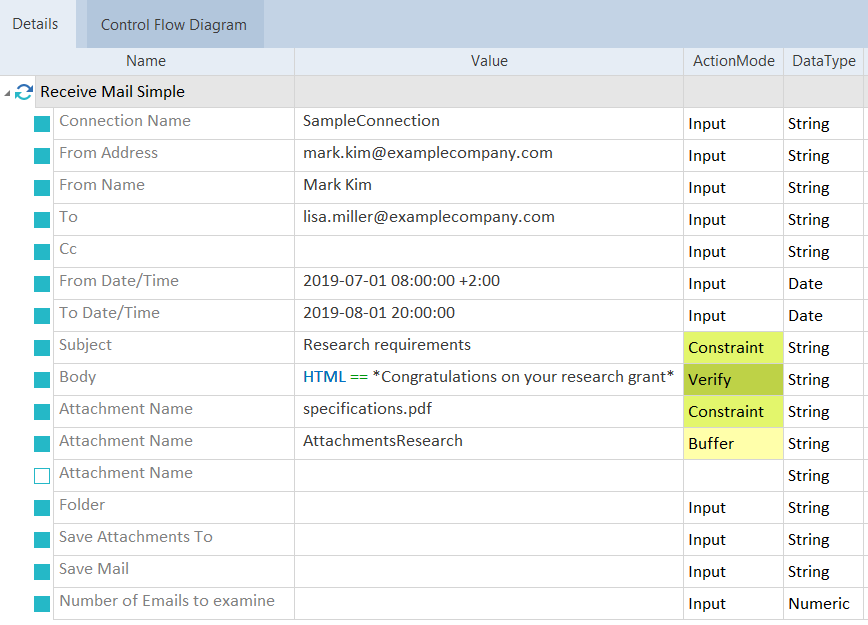
Search for an email with content