Database Modules
The Modules DI DB Expert, DB Open Connection, and DB Run SQL Statement support you in your Data Integrity tests with the following functions:
|
Module |
Description |
Location |
|---|---|---|
|
DI DB Expert |
Handle all database statements through a single Module. |
Tosca Data Integrity Modules And Samples.tsu subset: Standard modules->Engines->Database |
|
DB Open Connection |
Establish a connection to a database. |
Tosca Data Integrity Modules And Samples.tsu subset: Standard modules->Engines->Database |
|
DB Run SQL Statement |
Steer data sets of one or more database tables. |
Tricentis Tosca Standard subset: Standard modules->Engines->Database |
For information on how to use the Modules Open Connection and Run SQL Statement in Tosca DI tests, check out "Steer databases".
Use the DI DB Expert Module in your tests
Tricentis Tosca offers two types of DB Expert Module to handle your database statements:
-
DB Expert Module
-
DI DB Expert Module in the Tosca Data Integrity Modules And Samples.tsu subset specifically for your Tosca DI tests
The DI DB Expert Module offers the same base functionality as the DB Expert Module. However, it also allows you to use the connections you have saved to the Configurations section in your Data Integrity tests.
Use the DI DB Expert Module
The DI DB Expert Module contains the following ModuleAttributes:
|
ModuleAttribute |
Description |
|---|---|
|
Connection |
Specify which of your Database connections you want to use for your test. To do so, click into the Value field and select a connection from the drop-down menu. Note that you can't override the specified connection with dynamic expressions such as buffers or test configuration parameters. |
|
SQL Statement |
SQL statement you want to execute. The SQL Editor lets you create, maintain, and run SQL statements in your TestCases. |
|
Result Table |
Verify or buffer values from the result of your SQL statement. For more information on table steering, check out "Table".
You can export the result of your SQL Statement into a comma separated file. For more information, check out "Export the result of an SQL Statement". |
|
Close Connection |
The default value True closes the connection after executing the SQL statement. If you want to keep the connection open, change the value to False. |
This example shows how to query a data source and verify a value in this data source. Data Integrity performs the following actions:
-
It connects to the data source you have defined in the connection Sample connection 1.
-
The SQL statement queries the data source and retrieves all data from the table Customers.
-
It verifies whether the last cell in the first row of the table contains the value Vienna.
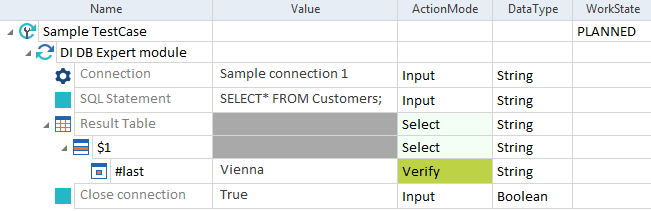
DI DB Expert Module - Example