Run Data Integrity tests in parallel
Tosca can run multiple Data Integrity TestCases in parallel, that is at the same time. This can save you time when you run tests .
Before you start
First, you need a valid DataIntegrityParallelExecution license for each Data Integrity TestCase you run in parallel. To learn about Data Integrity licensing for parallel execution, contact your
Then, make sure that the TestCases you plan to run in parallel are independent. If certain actions need to happen in a specific order, you cannot run them in parallel.
Consider your buffer operations
If you want to use buffers in TestCases that you run in parallel, make sure you set up each buffer in the same TestCase that reads them. You cannot set up a buffer in one TestCase and read it in another if these TestCases run in parallel.
Consider the order of your TestCases and TestSteps
To use Data Integrity Modules in parallel execution, you need to set their configuration parameter CanExecuteInParallel to True.
Certain Modules don't require any outside set up for their inputs. Since you can create independent TestSteps with these Modules, the value of their CanExecuteInParallel configuration parameter is True by default. These Modules are:
-
Metadata Comparison Module
-
DI DB Expert Module
-
TBox DB Expert Module
If you want to use different Data Integrity Modules in TestCases that run in parallel, you need to create the configuration parameter CanExecuteInParallel for them and set its value to True. Make sure that the TestSteps you create with these Modules have all their necessary input ready before they start.
For example, you create a TestStep with the Load Data into Caching Database from Customization Module to fetch some data that you want to compare with the Complete Row by Row Comparison Module. Then, you need to make sure these two TestSteps run in sequence and not in parallel TestCases.
Set up parallel execution
To set up parallel execution for Data Integrity TestCases, follow these steps:
-
Define the number of TestCases you want Tosca to run in parallel in Data Integrity Options at Project > Options > Tosca Data Integrity > Maximum number of tests run in parallel. The number must be higher than 1.
Note that you need as many DataIntegrityParallelExecution licenses as the number of TestCases you want to run in parallel.
-
Add your Data Integrity TestCases onto an ExecutionList. Tosca automatically creates a Parallel Block, that is a set of ExecutionEntries to run at the same time.
Alternatively, you can set up TestCase templates for Data Integrity with the Database to Database Wizard, so that Tosca automatically creates your ExecutionLists.
Now, Tosca runs the TestCases in each Parallel Block at the same time and the Parallel Blocks in sequence as they appear in your ExecutionList.
If needed you can add more TestCases in a Parallel Block than the number you define in Data Integrity Options for Maximum number of tests run in parallel. If you do so, Tosca first runs as many TestCases you define in Maximum number of tests run in parallel together. Then, as soon as a TestCase completes its run, Tosca starts running the next remaining one in the Parallel Block.
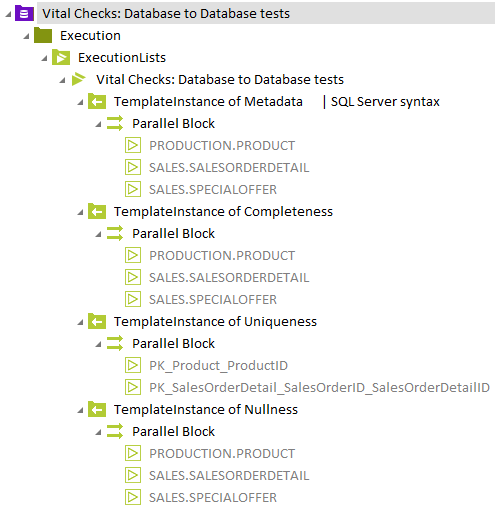
Click to enlarge: ExecutionList with Parallel Blocks
Set up parallel execution for distributed execution
You can also run your Data Integrity TestCases in parallel with Tosca Distributed Execution. We recommend this option if you're working with large test sets.
To use this option, follow these steps:
-
Set up parallel execution for Data Integrity to create an ExecutionList with Parallel Blocks.
-
Open the properties of a parallel block.
-
Enter a number between 2 to 8 as the value of the property Maximum parallel executions for distributed execution. This defines the number of TestCases that a Distribution Agent runs in parallel. Eight is the maximum. This setting overrides the number of TestCases you specify in Data Integrity Options for Maximum number of tests run in parallel.
Reorder Parallel Blocks and TestCases
You can use drag and drop to change the order of your Parallel Blocks in an ExecutionList. You can also move a TestCase from one parallel block to another using drag and drop.