TestCase-Design example
This chapter provides a practice example of how to build a TestCase-Design TestSheet to help you create structured TestCases for the different pricing models of mobile phone plans. This example uses linear expansion as the combinatorial method.
Suppose a mobile operator offers four base pricing models:
-
Mini
-
Standard
-
Flat rate
-
Prepaid
Suppose further that the charges are calculated with a tiered pricing system, with per minute fees charged for the following monthly call durations:
-
1 to 100 minutes
-
101 to 200 minutes
-
201 to 500 minutes
-
501 to 1000 minutes
-
1001 minutes and more
Suppose lastly that the charges for text messages are also calculated with a tiered pricing system, with per message fees charged for the following number of monthly messages:
-
1 to 100 messages
-
101 to 200 messages
-
201 to 500 messages
-
501 to 1000 messages
-
1001 messages and more
To organize and structure your tests, create a TestSheet in TestCase-Design with the Attributes Base, Minutes and Messages based on the pricing models above.
Create TestSheet
To effectively structure the above information, create a TestCase-Design TestSheet for the mobile network operator's billing charges as follows:
-
Create a TestCase-Design folder named Example.
-
Create a TestSheet named Mobile inside your newly created TestCase-Design folder.
-
Create an Attribute named Base beneath your newly created TestSheet.
-
Create Instances for the 4 different kinds of base pricing models:
-
Mini
-
Standard
-
Flate rate
-
Prepaid
-
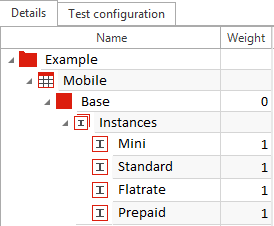
Base Attribute with 4 Instances
Since the pricing structure for minutes and messages per month are the same, you can minimize redundancy by creating a Class to which both of the Attribute Minutes and Attribute Messaages refer.
-
Right-click on your TestCase-Design folder, create a Class, and name it Amount.
-
Create the following Instances for your Class:
-
<0
-
0
-
1-99
-
100
-
101-199
-
200
-
201-499
-
500
-
501-999
-
1000
-
>1000
-
-
Drag and drop the Class Amount onto the TestSheet Mobile.
Tricentis Tosca automatically creates a Class reference. Name this reference Minutes.
-
Drag and drop the Class Amount onto the TestSheet Mobile a second time.
Tricentis Tosca automatically creates another Class reference. Name this references Messages.
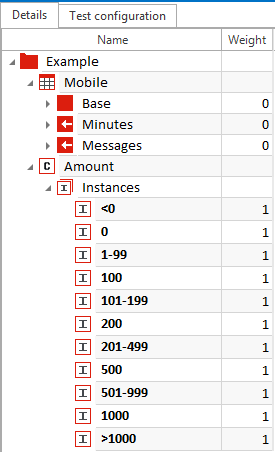
Class Amount and Minutes and Messages Class references
Both the Class references Minutes and Messages now contain the Instances from the Class Amount.
-
Change the character of the Instance <0 to Invalid to reflect that it is not possible to have a negative number of minutes or messages.
You can change the Instance character via the Toggle Character button in the ribbon menu, or by changing the Character value of the Instance in the Properties pane.

|
If you modify Instances within a Class, these modifications are also applied to Class references linked to that Class. |
-
Change the position of the Instances 0, 100, 200, 500 and 1000 to boundary values since they represent the boundaries between the different pricing tiers.
You can change the Instance position via the Toggle Position button in the ribbon menu, or by changing the Position value of the Instance in the Properties pane.
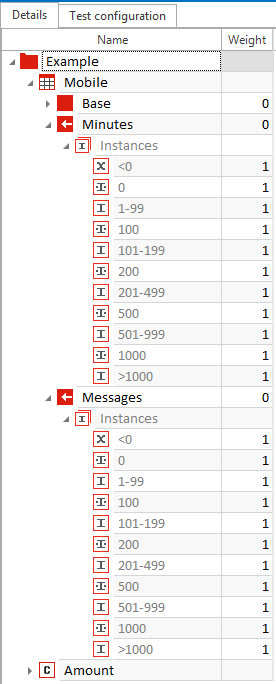
Invalid and boundary Instances
-
Change the Character of the Instance Standard within the Attribute Base to StraightThrough.
This reflects that the Standard plan is the most commonly sold plan and carries the largest risk in case of failure.
You can change the Instance character via the Toggle Character button in the ribbon menu, or by changing the Character value of the Instance in the Properties pane.
-
In the Class Amount, change the Character of the Instance 1-99 to StraightThrough.
-
Right-click on your TestSheet and select Generate Instances->Linear expansion from the context menu.
Tricentis Tosca generates 24 Instance combinations, the first of which is the StraighThrough and the rest of which differ from the StraightThrough in 1 Instance.

Instance combined with linear expansion