The Tosca HTML sample application will be used for this example. The value Motorcycle should be selected from the ComboBox on the first page (Type of vehicle).
-
The target object (control) must first be identified within the test object. The search is performed using the technical information of the module. This information is automatically identified when the application is scanned by the operation XScan.
The following parameters are directly relevant to this example:
BusinessType (Property)
This limits the search to a particular control type. In this case, an HtmlDocument is searched.
Engine (Configuration Param)
This parameter defines the technology to be used for steering. In this example, it is the XBrowser Engine 3.0, as determined by the identifier Html.
Title (Technical Param)
The technical property Lable indicates the title of the application window.
In this example, the system searches for an HTML document with the title Vehicle Insurance - en1. This document should remain available to further TestStepValues as the root element.
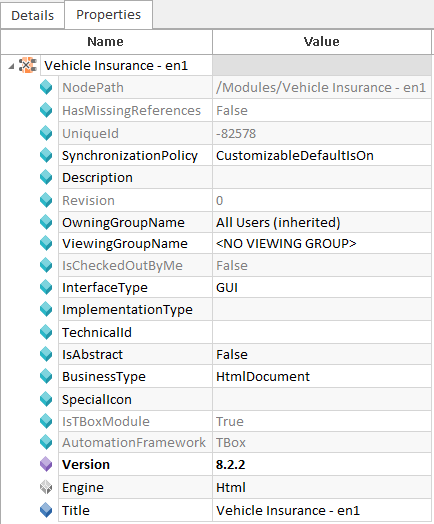
Parameters in the Module
-
The business-based definition for steering is made in the TestCase.
In this example, the system searches for a ComboBox with the name Type of vehicle. The value Motorcycle should be selected from the ComboBox. For this purpose, Input is selected as the ActionMode and the value Motorcycle is entered into the Value column.

TestStep Type of vehicle
-
The following parameters are needed to identify the ComboBox:
BusinessType (Property)
This limits the search to a particular control type. In this case, a Combobox is searched.
Engine (Configuration Parameter)
This parameter defines the technology to be used for steering. In this example, it is the XBrowser Engine 3.0, as determined by the identifier Html.
TechnicalAssociation (Configuration Parameter)
An Association is used to determine the association to be searched for the object within a superordinate context. In this example: TechnicalAssociation=All.
Identification Parameter
In this example, the object is uniquely identified by combining the properties Id=TypeOfVehicle and Tag=SELECT.

|
This information is automatically identified when the application is scanned with XScan. |
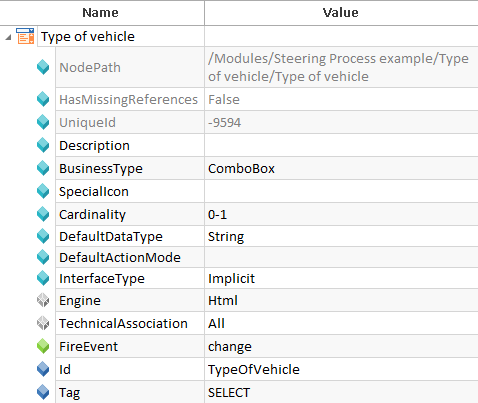
Module Attribute Type of Vehicle
-
Tests are executed via ExecutionLists in the Execution section.
If the specified document cannot be found, Tosca will write an according error message to the ExecutionLog.
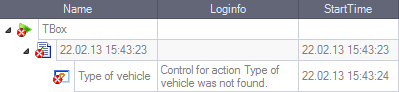
Error during execution