Starting and stopping JavaFX applications
Tosca Commander provides you with specific Modules for starting and stopping JavaFX applications. These Modules are part of the Standard subset. For further information on the Standard subset, see chapter "Use the Standard subset".
Starting JavaFX applications
In Tosca Commander, you can open JavaFX applications via the Module TBox Start Program.
Specify the path of the application to be opened via the parameter Path. Optionally, you can specify a working directory via the parameter Directory.
The parameter Arguments allows you to transfer arguments to the application in separate XTestStepValues.
If the application automatically executes a process upon starting, the parameter WaitForExit with the value True specifies that the test execution waits until this process is terminated or timed out.

TBox Start Program Module

|
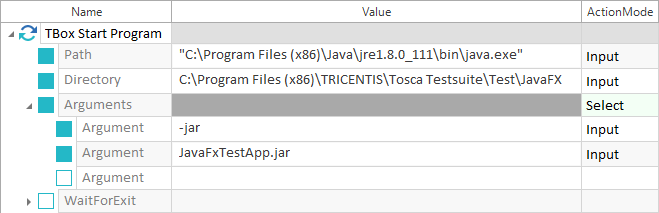
The example below illustrates how to start the JavaFX application JavaFXTestApp.jar by using the Module TBox Start Program. The parameter Path defines that the java.exe located under C:\Program Files (x86)\Java\jre1.8.0_111\bin is used to start the specified JavaFxTestApp.jar application. The parameter Directory defines that the JavaFxTestApp.jar file is located under C:\Program Files (x86)\TRICENTIS\Tosca Testsuite\Test\JavaFX. The Arguments -jar and JavaFxTestApp.jar specify that the java.exe should start the JavaFxTestApp.jar application.
Starting JavaFX applications |
Closing JavaFX applications
In Tosca Commander, JavaFX applications are closed via the Module TBox Window Operation.
Specify the window caption of the application to be closed via the parameter Caption.
You can close the application by using the parameter Operation and the value Close.

TBox Window Operation Module
|
|
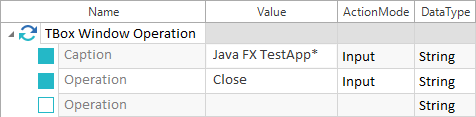
In the example below, the system closes the JavaFX application that starts with the window caption Java FX TestApp specified via the parameter Caption. The parameter Operation uses the command Close to close the window.
Closing JavaFX applications |